NVIDIA AI GPU Lineup 2026: B200, H100, H200, A100, L40S, DGX Spark, RTX 6000 — The Complete Guide
Pick the right NVIDIA AI GPU in 2026. Side-by-side specs, real workload fit, pricing, and the decision tree for B200 vs H100 vs H200 vs A100 vs L40S vs DGX Spark vs RTX 6000 Pro Blackwell.
NVIDIA's 2026 lineup is the broadest it's ever been, and the gap between "best on paper" and "right for your workload" is now enormous. A B200 is 4× the FLOPS of an H100 but you cannot rent one at consumer scale; an L40S is half the memory of an H100 but the right pick for thousands of inference shops. A DGX Spark gives you 128 GB of unified memory on a desk for the price of one month of an H100 lease — but its peak FLOPS are an order of magnitude below.
This guide walks through every SKU you'll realistically consider in 2026, what each one is actually good at, and the decision tree for choosing between them.
Table of contents
- Key takeaways
- Mental model: the NVIDIA lineup in one minute
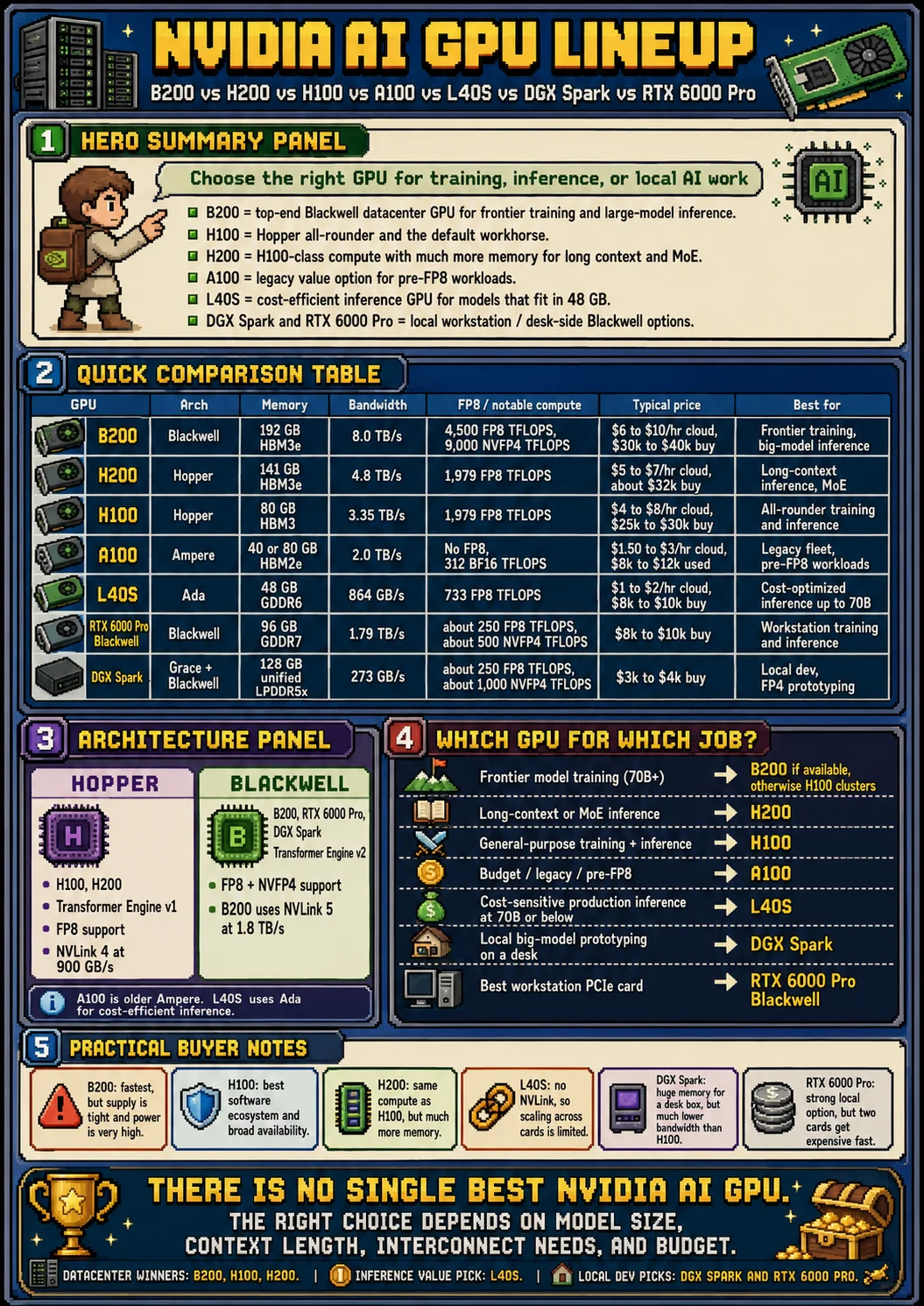
- Quick comparison: the full lineup
- The two architectures that matter
- B200 — Blackwell datacenter flagship
- H100 — Hopper datacenter workhorse
- H200 — Hopper memory refresh
- A100 — Ampere legacy fleet
- L40S — Ada datacenter inference / graphics dual-use
- DGX Spark — Grace-Blackwell desk-side workstation
- RTX 6000 Pro Blackwell — workstation flagship
- Pricing: what you actually pay in 2026
- Decision tree: which GPU for which job
- What about consumer GPUs (RTX 5090)?
- Procurement reality: availability, lead times, alternatives
- Power, cooling, and rack budgets
- GB200 NVL72 and rack-scale topology
- AMD MI300X, Trainium, TPU v5p — the alternatives, briefly
- Total cost of ownership: cloud vs purchase
- Precision formats deep dive: TF32, FP16, BF16, FP8, INT8, FP4
- HBM evolution: HBM2e to HBM4
- NVLink generations: NVL3, NVL4, NVL5 and beyond
- Per-workload SKU picks: training, inference, fine-tuning, RAG, agents
- Multi-vendor: AMD, TPU, Trainium, Cerebras, Groq, Tenstorrent, SambaNova
- Cloud availability and lead times
- Pricing trajectory and the next 18 months
- Export-control status and geographic availability
- Secondhand market for A100s and H100s
- The Rubin family preview: what 2027 changes
- GB200 NVL72: cooling, power, weight, networking detail
- Real-world benchmark data: MLPerf, public deployments
- The bottom line
- FAQ
- Glossary
- References
- Per-SKU deep dive: every datacenter card explained
- Precision format support matrix per generation
- HBM generation table: HBM2 through HBM4
- NVLink and NVSwitch generation table
- Multi-vendor deep dive: AMD MI355X, TPU v7, Trainium2, Cerebras WSE-3, Groq
- Cloud GPU availability and pricing matrix
- Per-workload SKU selector with worked examples
- Rubin family 2027 preview: R100, GR200, rack-scale
- MLPerf v4.1 results spot check
- Where to start: a decision flow chart
Key takeaways
- Training frontier models → B200 (when you can get them) or H100/H200 in 8×SXM nodes with InfiniBand. Anything smaller is a non-starter at frontier scale.
- Fine-tuning ≤70B on a budget → H100 if available, H200 if context length matters, L40S if you're cost-sensitive and don't need NVLink.
- Inference at scale (>1k QPS) → H100 for big models, L40S for everything ≤70B that fits in 48 GB.
- Local dev / single-node prototyping → DGX Spark (128 GB unified at FP4 for the price of a high-end laptop) or RTX 6000 Pro Blackwell (96 GB GDDR7, fits in any workstation).
- Cheap legacy fleet → A100 still works fine for pre-FP8 workloads but you're losing ~50% throughput vs Hopper on any FP8-aware model.
The two biggest 2026 changes: B200 supply finally improved (Q2 onward), and NVFP4 (4-bit float with hardware-accelerated dequant on Blackwell) made workstation GPUs viable for serious LLM work for the first time.
Mental model: the NVIDIA lineup in one minute
The named problem is the SKU sprawl: NVIDIA ships seven distinct AI-relevant SKUs in 2026 — A100, H100, H200, L40S, B200, GB200 NVL72, RTX 6000 Pro Blackwell, plus DGX Spark on the desk-side end — and each one has both a sweet spot and a trapdoor. Pick by spec sheet and you will buy memory you cannot feed, bandwidth you cannot use, or FLOPS your model cannot consume at the precision you actually run.
The useful analogy is a kitchen knife set. A chef's knife (H100) handles 80% of jobs. A cleaver (B200, GB200) is overkill for tomatoes and essential for bone. A paring knife (L40S) is small, cheap, and the right tool for fine work but useless on a roast. A bread knife (H200) is one parameter different from the chef's knife (memory) and that one parameter is the whole point. Buying the wrong knife is not catastrophic; using it wrong is.
| GPU | Sweet spot | Trapdoor |
|---|---|---|
| B200 | Frontier training, FP4 inference | Power/cooling, supply, NVL72 lock-in |
| H200 | Long-context inference, MoE | Same compute as H100; you're buying memory |
| H100 | All-rounder training + serving | No FP4; aging for biggest models |
| A100 | Pre-FP8 legacy fleets | ~50% throughput hit on modern workloads |
| L40S | ≤70B inference, cost ceiling | No NVLink, no HBM, no training at scale |
| RTX 6000 Pro | Workstation training/inference | Not a datacenter card, no SXM, limited NVLink |
| DGX Spark | Desk-side FP4 prototyping | 273 GB/s bandwidth — slow per byte |
The production one-liner. The single decision that drives almost every spec sheet is whether you need NVLink-class interconnect:
if you train >70B end-to-end or serve a model that doesn't fit on one GPU:
    you need SXM (H100/H200/B200) in HGX or GB200 NVL72
else:
    PCIe (L40S, RTX 6000 Pro) or desk-side (DGX Spark) is usually fine
The sticky number: GB200 NVL72 delivers 1.4 exaFLOP of FP4 in a single rack — 72 Blackwell GPUs over fifth-generation NVLink as one fabric. It is the spec that anchors frontier-lab 2026 procurement decisions, and it is the spec that fixes the floor of how big a single coherent model can train.
Quick comparison: the full lineup
| GPU | Arch | Year | Memory | BW (TB/s) | BF16 TFLOPS | FP8 TFLOPS | FP4 TFLOPS | TDP | NVLink | Form factor | List $/hr (cloud) | Best for |
|---|---|---|---|---|---|---|---|---|---|---|---|---|
| B200 | Blackwell | 2024 | 192 GB HBM3e | 8.0 | 2,250 | 4,500 | 9,000 | 1000W | 1.8 TB/s (NVL5) | SXM6 / HGX | $6–10 | Frontier training, big-model inference |
| H200 | Hopper | 2024 | 141 GB HBM3e | 4.8 | 989 | 1,979 | — | 700W | 900 GB/s (NVL4) | SXM5 / HGX | $3–5 | Long-context inference, MoE |
| H100 | Hopper | 2022 | 80 GB HBM3 | 3.35 | 989 | 1,979 | — | 700W | 900 GB/s (NVL4) | SXM5 / PCIe | $2–4 | All-rounder training + inference |
| A100 | Ampere | 2020 | 40/80 GB HBM2e | 2.0 | 312 | — | — | 400W | 600 GB/s (NVL3) | SXM4 / PCIe | $1–2 | Legacy fleet, pre-FP8 workloads |
| L40S | Ada | 2023 | 48 GB GDDR6 | 0.86 | 362 | 733 | — | 350W | None | PCIe 2-slot | $1–2 | Inference, fine-tune ≤70B |
| RTX 6000 Pro | Blackwell | 2025 | 96 GB GDDR7 | 1.79 | ~125 | ~250 | ~500 | 600W | NVLink Bridge | PCIe 2-slot | n/a (buy) | Workstation training/inference |
| DGX Spark | Grace+BW | 2025 | 128 GB unified | 0.27 (LPDDR5x) | ~125 | ~250 | ~1,000 | 240W | Internal C2C | Desk-side box | n/a (buy) | Local dev, FP4 prototyping |
All FLOPS are dense unless noted. Memory bandwidth for DGX Spark refers to the unified Grace+Blackwell memory pool — not directly comparable to HBM (slower per byte but much larger pool). Cloud prices are list at major hyperscalers (AWS p5, GCP A3, Lambda, CoreWeave); spot and committed-use pricing diverges significantly. See Pricing and References for sources.
If you're trying to put these into a serving stack, the closest companions to this guide are mixed-precision training (BF16/FP8/NVFP4), KV cache memory math, NVLink and rack-scale topology, and distributed LLM training.
The two architectures that matter
In 2026 you're realistically choosing between Hopper (H100, H200) and Blackwell (B200, RTX 6000 Pro, DGX Spark). Ampere (A100) is still in datacenters but new deployments rarely target it. Ada Lovelace (L40S) is its own thing — a Hopper-era datacenter card that uses the consumer-class Ada architecture for cost reasons.
Hopper (2022–2024)
- Transformer Engine v1: hardware-accelerated FP8 with per-tensor scaling. The first generation where FP8 became a default pretraining format (DeepSeek-V3 trained the full V3 model in FP8).
- HBM3 (H100) / HBM3e (H200): 80 / 141 GB, 3.35 / 4.8 TB/s.
- NVLink 4: 900 GB/s GPU-to-GPU.
- 8× SXM5 in an HGX baseboard: the standard training node. DGX H100/H200 systems wrap this with networking + cooling.
Blackwell (2024–)
- Transformer Engine v2: FP8 + NVFP4 (4-bit float with hardware-accelerated dequantization). Double the FLOPS-per-watt of Hopper at FP8, and 4× at FP4.
- HBM3e: 192 GB on B200; same HBM tech as H200 but more stacks.
- NVLink 5: 1.8 TB/s (2× Hopper).
- GB200 NVL72: a single rack containing 72 GPUs all on NVLink — effectively a 13.5 TB GPU memory pool addressable as one cluster. Game-changing for very large models.
- Dual-die GPU: each B200 is two Blackwell dies on a single package linked by a 10 TB/s interconnect — a step toward "GPU as chiplet system".
The Blackwell jump is the biggest single-generation leap NVIDIA has shipped in five years. If your workload uses FP8 or FP4, the cost-per-token economics on B200 are roughly half H100.
For workstation/desk-side use, Blackwell shows up as RTX 6000 Pro and DGX Spark — both inherit the FP4 tensor cores but use GDDR7 or LPDDR5x instead of HBM.
B200 — Blackwell datacenter flagship
The current top of the stack.
Specs (HGX B200, per GPU):
- 192 GB HBM3e, 8.0 TB/s
- 2,250 TFLOPS BF16 dense
- 4,500 TFLOPS FP8 dense
- 9,000 TFLOPS NVFP4 dense
- 1000 W TDP
- NVLink 5 at 1.8 TB/s
- 8× per HGX baseboard → 1.54 TB of GPU memory per node
Where it shines:
- Frontier pretraining: at FP8 you get ~2.3× the per-GPU throughput of H100. The memory bump from 80 → 192 GB means activations + optimizer state for much bigger model shards fit in a single GPU, reducing pipeline depth.
- NVFP4 inference: a 405B-parameter model fits comfortably in two B200s at NVFP4. The same model needs 8× H100 to fit at FP8. Inference cost per token drops by ~3–4×.
- GB200 NVL72: 72 GPUs in one NVLink domain = effectively a 13.5 TB single-address-space GPU. For models that don't fit in 8 GPUs (DeepSeek-V3, Llama 4 405B+, GPT-5+), this changes the math.
Where it doesn't fit:
- Anything that doesn't use FP8 or NVFP4: at BF16 the gap to H100 narrows considerably (2.3×, not 4×).
- Small inference shops: the 1000 W TDP needs liquid cooling. Air-cooled deployments are not really an option in production.
- Anyone needing them this quarter: supply improved in Q2 2026 but the big clouds still ration. Lead times for direct purchase are 6+ months.
Pricing in 2026:
- AWS p6 (B200 nodes): $6–10/hr per GPU on-demand
- CoreWeave / Lambda: $5–8/hr per GPU
- Purchase: ~$30,000–40,000 per GPU through HGX board partners (8-GPU baseboards: $250k–320k)
H100 — Hopper datacenter workhorse
The workhorse. Still the default for most training and inference workloads in 2026 because supply is good, software is mature, and the price has dropped substantially since 2023.
Specs:
- 80 GB HBM3, 3.35 TB/s
- 989 TFLOPS BF16 dense
- 1,979 TFLOPS FP8 dense
- 700 W TDP (SXM5), 350 W (PCIe variant)
- NVLink 4 at 900 GB/s
- 8× SXM5 per HGX H100 baseboard → 640 GB memory per node
Where it shines:
- Pretraining ≤200B at FP8: with Megatron-LM 3D parallelism on 64–512 H100s, this is the canonical training stack.
- Mature software: every inference framework (vLLM, SGLang, TRT-LLM) is tuned for H100 first. FlashAttention, FlashInfer, CUTLASS — all H100-optimized.
- Single-node inference for 70B–200B at FP8: an 8×H100 node serves Llama-70B at thousands of tok/s.
Where it doesn't fit:
- >200B models in single 8-GPU nodes: 640 GB total isn't enough for KV cache + weights + activations at large batch sizes. You either drop to H200 (141 GB per GPU) or pay the inter-node networking cost.
- Long-context heavy workloads: at 128k+ context, KV cache pressure makes 80 GB feel cramped.
Pricing in 2026:
- AWS p5: $4–8/hr per GPU on-demand
- Lambda / CoreWeave: $2–4/hr on demand, $1.50–2.50 with commitment
- Decentralized (io.net, Akash): $1.50–2.50/hr — see decentralized GPU compute for caveats
- Purchase: ~$25,000–30,000 per GPU
H200 — Hopper memory refresh
H200 is H100 with bigger, faster memory. Same compute, same architecture, drop-in compatible with HGX H100 systems.
Specs (delta from H100):
- 141 GB HBM3e (vs 80 GB HBM3) — +76%
- 4.8 TB/s bandwidth (vs 3.35 TB/s) — +43%
- Same 989 TFLOPS BF16, same 1979 TFLOPS FP8, same 700 W TDP
- Same NVLink 4 (900 GB/s)
Where it shines:
- Long-context inference: the 76% memory bump goes directly into KV cache headroom. A 70B model at 256k context that needed 4 H100s now fits in 2 H200s.
- MoE serving: more memory per GPU = fewer GPUs needed to hold all experts. Particularly relevant for DeepSeek-V3 / Llama-4 style architectures — see mixture-of-experts serving.
- Drop-in HGX upgrade: same socket, same baseboard, same cooling. Many H100 fleets are mid-refresh to H200 without rack-level changes.
Where it doesn't fit:
- Compute-bound training: no compute uplift over H100. If your training is FLOPS-bound (most pretraining), H200 gives you nothing extra.
- B200 is available: at the high end, B200 is a genuine generational jump. H200 is a half-step.
Pricing in 2026:
- AWS p5e: $5–7/hr per GPU
- Lambda / CoreWeave: $3–5/hr
- Purchase: ~$32,000 per GPU
A100 — Ampere legacy fleet
The veteran. Still the most-deployed AI GPU on the planet by count, despite Hopper's two-year reign.
Specs:
- 40 GB or 80 GB HBM2e, 2.0 TB/s (80 GB variant)
- 312 TFLOPS BF16/FP16 dense (1248 TFLOPS sparse, rarely matters)
- No FP8: A100 does not have FP8 tensor cores. You're stuck at BF16/FP16 minimum.
- 400 W TDP (SXM4), 250 W (PCIe)
- NVLink 3 at 600 GB/s
Where it shines:
- Pre-FP8 workloads: research code that was tuned for A100 still runs fine. BERT-class models, classic vision, RL.
- Cost-sensitive inference at small batch: at <$1.50/hr per GPU on spot markets, A100 is genuinely cheap.
- Existing fleets: if you already own thousands of A100s, the migration cost to Hopper isn't always worth it.
Where it doesn't fit:
- Anything FP8-aware: you're losing roughly half the throughput a similar-cost H100 would deliver, because the FP8 path doesn't exist on A100.
- Training new frontier models in 2026: nobody is pretraining a >70B model on A100 anymore. Communication overhead, lack of FP8, and slower memory all stack up.
Pricing in 2026:
- AWS p4d/p4de: $1.50–3/hr per GPU
- Lambda: $1–2/hr
- Decentralized: $0.50–1.50/hr
- Used: ~$8,000–12,000 per GPU on the secondary market
A100 is the value-buy of 2026 if your software stack doesn't need FP8. For everyone else, it's a relic.
L40S — Ada datacenter inference / graphics dual-use
The odd one out. L40S uses the Ada Lovelace architecture (same family as RTX 4090) packaged for the datacenter. It targets a different niche than the SXM cards: rack-friendly inference with no NVLink, lower TDP, and unusually broad workload support (it has display outputs and full RTX graphics).
Specs:
- 48 GB GDDR6 (not HBM), 864 GB/s
- 362 TFLOPS BF16 dense
- 733 TFLOPS FP8 dense
- 350 W TDP
- PCIe 4.0 only — no NVLink
- 2-slot form factor, fits standard 1U/2U servers
Where it shines:
- Inference of ≤70B at FP8: with 48 GB you fit Llama-70B-FP8 with room for KV cache up to ~32k context. Two L40S boxes can serve 70B + MoE at strong tok/s.
- Mixed workloads: rendering, video transcoding, AI image/video generation. L40S has full RTX cores including hardware ray tracing and OptiX — relevant if you're running Stable Diffusion, ComfyUI, video model inference.
- Cost-sensitive serving: the lower TDP and PCIe-only form factor mean dramatically cheaper hosting. L40S boxes are widely available at $1–2/hr.
Where it doesn't fit:
- Anything that needs NVLink: tensor parallelism across L40S cards must use PCIe (32 GB/s) instead of NVLink (900 GB/s). For models that need to be sharded across 2+ GPUs, this is brutal. Use pipeline parallelism instead.
- Training larger than 7B: 48 GB and no high-bandwidth interconnect means anything bigger gets pipeline-parallel-only training, which is slow.
- >70B at FP16/BF16: doesn't fit.
Pricing in 2026:
- Cloud: $1–2/hr (Lambda, CoreWeave, RunPod)
- Decentralized: $0.50–1.20/hr
- Purchase: ~$8,000–10,000 per GPU
L40S is the right answer for a huge swath of inference workloads that don't fit either "frontier" (H100/B200) or "workstation" (RTX 6000) framing. Don't sleep on it.
DGX Spark — Grace-Blackwell desk-side workstation
NVIDIA's new entry in 2025–2026, and the most surprising product in the lineup. DGX Spark is a desk-side workstation built around the GB10 Grace-Blackwell Superchip: a 72-core Arm CPU and a Blackwell GPU sharing 128 GB of unified LPDDR5x memory at 273 GB/s.
Specs:
- GB10 Superchip: 72-core Grace CPU + Blackwell GPU on one package
- 128 GB unified LPDDR5x (not HBM) at 273 GB/s — the entire memory pool is addressable by both CPU and GPU without copies
- ~125 TFLOPS BF16, ~250 TFLOPS FP8, ~1,000 TFLOPS NVFP4
- 240 W TDP for the whole system
- C2C interconnect (CPU↔GPU): 600 GB/s
- ConnectX-7 networking: 200 Gb/s
- Two DGX Sparks can be paired via ConnectX-7 for 256 GB combined memory
Where it shines:
- Local LLM dev at frontier scale: at NVFP4, 200B parameters fit in 128 GB. A 200B model on your desk, with no cloud bill, doing tok/s in the dozens.
- Fine-tuning prototyping: try LoRA / QLoRA on 70B models without paying for cloud H100s. The unified memory is a huge deal for activations during backward.
- Inference on quantized big models: DeepSeek-V3, Llama 4, Qwen 3 all run at FP4 with full quality preserved on a single Spark.
- Robotics / edge AI: the small form factor + low TDP is genuinely deployable. Not just a dev box.
Where it doesn't fit:
- Production serving: 273 GB/s memory bandwidth is the headline weakness. Per-token decode rate on a 70B+ model is going to be much slower than an H100 (decode is memory-bound — see KV cache memory math for the math).
- Multi-GPU training: the C2C is internal-only. The two-Spark pairing via 200 Gb/s ConnectX-7 is much slower than NVLink 5.
- Frontier pretraining: ~250 TFLOPS BF16 is too small to train anything you couldn't train on consumer-grade hardware.
Pricing:
- Direct from NVIDIA: $3,000–4,000 (varies by config)
- Available since late 2025; widely shipping in 2026
DGX Spark is the most exciting workstation product since the original Titan. It is not a substitute for a datacenter GPU — it's a different category. But for "I want to run a 200B model in my house," it's the first credible answer.
RTX 6000 Pro Blackwell — workstation flagship
The PCIe Blackwell card. Slots into any workstation, runs on a 1500 W PSU, and gives you 96 GB of GDDR7 memory — more than an H100.
Specs:
- 96 GB GDDR7, 1.79 TB/s
- ~125 TFLOPS BF16, ~250 TFLOPS FP8, ~500 TFLOPS NVFP4 (dense)
- 600 W TDP (max-Q variants at 300 W also exist)
- PCIe 5.0 x16
- NVLink Bridge: 2 cards can be paired for 192 GB total at 224 GB/s (much slower than SXM NVLink)
- 2-slot form factor, blower cooler — fits dense workstation chassis
Where it shines:
- Single-GPU LLM work at FP4: 96 GB at NVFP4 fits 200B parameters. Same envelope as DGX Spark but with much higher memory bandwidth (1.79 TB/s vs 273 GB/s).
- Multi-tenant inference: 96 GB is enough to serve multiple ≤70B models simultaneously with isolated KV caches.
- Workstation training: pair two RTX 6000 Pro cards via NVLink Bridge → 192 GB pool. Train 7B–30B models from scratch on a desk.
- Drop-in for an existing dev workstation: unlike DGX Spark (whole system replacement), you can add an RTX 6000 Pro to your current rig.
Where it doesn't fit:
- Multi-GPU beyond 2 cards: NVLink Bridge only supports pairs. For 4+ GPUs you're on PCIe, which is slow for tensor parallelism.
- Production datacenter deployment: not designed for rack density. No HGX baseboards.
- Cost ceiling: at $8,000–10,000 per card, two cards is $20k — close to a year of L40S cloud rental.
Pricing:
- MSRP: ~$8,000–10,000 per card
- System integrator builds (workstations w/ 2× RTX 6000 Pro + Threadripper): $25,000–35,000
The RTX 6000 Pro Blackwell is the most powerful single PCIe card you can buy in 2026. If you need workstation-form-factor AI without renting cloud, this is it.
Pricing: what you actually pay in 2026
Cloud GPU pricing has fragmented dramatically. The "list price" on hyperscalers is now ~2–3× what decentralized markets and smaller specialists charge. Numbers below are typical on-demand rates as of 2026-Q2 — committed-use and spot pricing diverges further (see References for sources).
| GPU | AWS / GCP list | Specialist (Lambda/CoreWeave) | Decentralized (io.net/Akash) | Purchase |
|---|---|---|---|---|
| B200 | $6–10/hr | $5–8/hr | $4–7/hr | $30–40k |
| H200 | $5–7/hr | $3–5/hr | $2.5–4/hr | ~$32k |
| H100 | $4–8/hr | $2–4/hr | $1.5–2.5/hr | ~$25–30k |
| A100 | $1.50–3/hr | $1–2/hr | $0.50–1.50/hr | ~$8–12k (used) |
| L40S | $1.20–2/hr | $1–1.50/hr | $0.50–1.20/hr | ~$8–10k |
| RTX 6000 | n/a | n/a | n/a | $8–10k |
| DGX Spark | n/a | n/a | n/a | $3–4k |
For deeper economics — why decentralized comes in cheaper, when to use it, and when not to — see Decentralized GPU Compute: The Complete Guide.
Decision tree: which GPU for which job
1. Are you training a model from scratch?
- Frontier (≥70B): B200 if available, else H100 in 8-GPU nodes with InfiniBand. Anything smaller is infeasible.
- Mid-size (7B–70B): H100 nodes (8× SXM5). H200 if context length is critical.
- Small (<7B): A100 or L40S work fine. Or two RTX 6000 Pros if you want a workstation.
2. Are you fine-tuning a pretrained model?
- 70B+ full fine-tune: H100 or H200 cluster. NVLink essential.
- 70B LoRA/QLoRA: single H100 or H200 works. DGX Spark works at FP4 for prototyping.
- ≤30B: L40S, RTX 6000 Pro, or DGX Spark. All viable.
3. Are you serving production inference?
- >200B model, high QPS: B200 (NVL72 if available) or H100/H200 clusters.
- 70B–200B model: H100 with FP8, H200 if KV-cache-heavy, L40S clusters for cost-sensitive.
- ≤70B: L40S is the cost-optimized answer.
- Multi-tenant ≤30B: L40S or RTX 6000 Pro.
4. Are you developing locally?
- Want to run frontier-scale models on a desk: DGX Spark (FP4) or RTX 6000 Pro (96 GB FP4/FP8).
- Just need to test code paths: any consumer GPU (RTX 4090/5090) is fine.
5. Are you on a tight budget?
- <$500/month: rent a single A100 spot at $0.50/hr × ~1000 hrs, or buy a used 4090/5090.
- <$5k upfront: DGX Spark.
- <$10k upfront: RTX 6000 Pro Blackwell.
What about consumer GPUs (RTX 5090)?
Briefly, since the question comes up. RTX 5090 (Blackwell consumer, 32 GB GDDR7, 1.79 TB/s, $2k) is genuinely useful for AI work in 2026, but it's in a different category from the "Pro" lineup:
- Memory ceiling: 32 GB is small. 30B models at FP8 fit with no room for KV cache; 70B doesn't fit even at FP4.
- No ECC: bit-flips on long-running training are a real risk.
- Drivers: NVIDIA does not officially support consumer GPUs in datacenter deployments. Renting out a 5090 farm risks driver-level restrictions.
- No NVLink: same PCIe-only situation as L40S, but worse because there's no high-end PCIe-based fabric option.
For local dev, RTX 5090 is fine. For anything serious, step up to RTX 6000 Pro or DGX Spark.
Procurement reality: availability, lead times, alternatives
The story in 2026:
- B200: 6+ month lead times for direct purchase. Cloud rental is the only realistic path for most teams.
- H100: widely available. Cloud spot pricing has dropped 40% since 2024. Purchase straightforward.
- H200: 3–4 month lead times. Cloud availability good at Lambda/CoreWeave.
- A100: secondary market is flooded. Used 80 GB units at $8–12k. New A100s no longer recommended for new builds.
- L40S: best availability of any AI-class GPU. Order today, ship in 2 weeks.
- DGX Spark: shipping in volume. NVIDIA direct or partner. 4–8 weeks.
- RTX 6000 Pro: shipping. Workstation OEMs (Lenovo, Dell, HP) have configured builds available.
If you can't get the GPU you want, look at:
- Decentralized markets (io.net, Akash, Vast.ai) — see Decentralized GPU Compute for the full picture
- AMD MI300X — competitive with H100 on paper, software still maturing
- Cerebras / Groq / Tenstorrent — alternative architectures, narrow workload fits
Power, cooling, and rack budgets
The spec sheet talks about FLOPS; the data center talks about kilowatts. Most teams that have not stood up GPU infrastructure before are surprised by how much of the deployment problem is electrical and thermal rather than computational. The numbers below are the order-of-magnitude budgets you actually need when planning a deployment.
Per-node power draw
A single 8×B200 HGX node draws ~10 kW under load (8 × 1000W GPUs + ~2 kW for CPU, NVSwitch, networking, fans). An 8×H100 HGX node draws ~7 kW. An 8×L40S 2U server draws ~3 kW. These are sustained loads, not peaks; sizing for peak adds 20–30% headroom.
A standard data-center rack delivers 7–20 kW depending on the facility tier. Modern AI-class colocation offers 30–50 kW per rack for liquid-cooled deployments, with hyperscalers operating 100–200 kW racks for the densest Blackwell deployments. The headline math: an 8×B200 HGX node occupies 4–6U and draws 10 kW, so a 42U rack can hold 4–6 such nodes if power is the binding constraint, or 8 if cooling is the binding constraint. Most production deployments are power-bound, not space-bound.
Cooling: air vs liquid
Air cooling tops out around 700–800W per GPU under good conditions. Hopper (700W TDP) is the last NVIDIA datacenter generation that runs comfortably on air. Blackwell B200 at 1000W requires direct-to-chip liquid cooling for sustained workloads; air-cooled B200 variants exist but throttle under sustained load. The GB200 NVL72 rack is liquid-cooled by design and not deployable in air-cooled facilities at all.
The implication for procurement: if your data center is air-cooled and you cannot retrofit, you are buying Hopper, not Blackwell. The retrofit cost for direct-to-chip liquid loops in an existing facility is $100K–$500K per rack depending on the starting infrastructure.
Networking power
The InfiniBand or Ethernet switching layer for a multi-rack training cluster is itself substantial power draw. A Quantum-2 NDR400 InfiniBand switch (used in most H100 / B200 training clusters) draws ~1.7 kW. A full fat-tree topology for 1024 GPUs needs ~30 switches plus cables, totaling another 50 kW of switch power on top of the GPU draw. Most cluster-sizing spreadsheets ignore this; most real deployments rediscover it the hard way.
GB200 NVL72 and rack-scale topology
The GB200 NVL72 is the single most important new product in the 2026 lineup, and deserves its own treatment because it changes the topology assumptions that every other GPU in this guide rests on.
What it is
72 B200 GPUs (paired with 36 Grace CPUs) in a single liquid-cooled rack, all connected via NVLink 5 through a 9-switch NVSwitch fabric. The entire rack acts as a single NVLink domain, addressable as a 13.5 TB unified GPU memory pool. NVLink 5 between any pair of GPUs in the rack delivers 1.8 TB/s — roughly two orders of magnitude faster than the inter-node InfiniBand (400 Gb/s = 50 GB/s) that connects multi-rack H100 clusters.
Why it matters
For models too large to fit in 8 GPUs — DeepSeek-V3 671B, hypothetical 1T+ models, large-memory MoE configurations with many experts — the NVL72 collapses what was previously a multi-node tensor-parallel + pipeline-parallel arrangement into a single NVLink domain. Tensor parallelism across 72 GPUs becomes feasible without InfiniBand crossings, which kills the communication overhead that limits multi-node TP. Training throughput on frontier-scale models is reportedly 2–4× higher per FLOP on NVL72 versus equivalent H100 clusters, with most of the gain coming from communication elimination, not raw compute.
What it costs
A single NVL72 rack is on the order of $3M list, with deployment requiring 120+ kW of power and liquid cooling. The big hyperscalers (AWS, Azure, GCP, Oracle, CoreWeave) are racking these by the thousands; smaller specialists are starting to offer hosted NVL72 capacity at $4–8/GPU-hour. For most teams, NVL72 access is a cloud rental decision, not a purchase decision.
When you actually need it
If your model fits in 8 GPUs at the precision you need, you do not need NVL72; an HGX B200 node is sufficient and cheaper. If your model needs 16–64 GPUs, NVL72 is overkill but the InfiniBand alternative is expensive in engineering time. If your model needs ≥72 GPUs as a single tensor-parallel domain, NVL72 is the only realistic option — see NVLink and rack-scale topology for the deeper interconnect math.
AMD MI300X, Trainium, TPU v5p — the alternatives, briefly
NVIDIA is not the only option, and 2026 is the year the alternatives became credible for some workloads. Brief notes on the most relevant non-NVIDIA accelerators.
| Accelerator | Vendor | Memory | Approx. FP8 | Software maturity | Best for |
|---|---|---|---|---|---|
| MI300X | AMD | 192 GB HBM3 @ 5.3 TB/s | ~2,600 TFLOPS | ROCm + PyTorch + vLLM: working, 10–30% behind NVIDIA | Inference of large models where memory matters more than peak compute |
| MI325X / MI350X | AMD | 256 GB HBM3e | ~2,800 TFLOPS | Same | Same, with extended memory |
| TPU v5p | 95 GB HBM @ 2.8 TB/s | ~459 TFLOPS BF16 | JAX-first; PyTorch via PyTorch/XLA | Google-internal workloads, JAX users, Gemini-class training | |
| TPU v6e ("Trillium") | 32 GB HBM @ 1.6 TB/s | ~918 TFLOPS BF16 | Same | Inference-optimized TPU | |
| AWS Trainium2 | Amazon | 96 GB HBM | ~1,300 TFLOPS BF16 | Neuron SDK; PyTorch supported; limited framework coverage | Training in AWS at lower cost than P5 |
| Trainium3 | Amazon | 128 GB HBM | ~2,000+ TFLOPS BF16 | Neuron SDK | Same, larger memory |
| Cerebras WSE-3 | Cerebras | 44 GB on-chip SRAM | Custom (wafer-scale) | Cerebras SDK; PyTorch supported | Throughput-optimized training and single-model inference at extreme TPS |
| Groq LPU | Groq | 230 MB on-chip SRAM | Custom (deterministic) | Groq Compiler | Latency-optimized inference; extreme TPS on small batches |
The honest read
For most teams in 2026, NVIDIA is still the right answer because the software stack — PyTorch, Triton, FlashAttention, vLLM, TensorRT-LLM, the CUDA Graphs and Triton kernel ecosystems — is years ahead of any alternative. The alternatives become compelling when you have a specific workload that exploits their differentiation: MI300X for memory-bound inference of frontier-size models, TPU v5p if you are already a JAX shop, Groq for ultra-low-latency inference of moderate-size models, Cerebras for unusually small-batch large-model throughput. For general AI infrastructure, NVIDIA's moat remains real.
Total cost of ownership: cloud vs purchase
The cloud-vs-buy decision is one of the more consequential infrastructure choices and one of the most poorly reasoned. Most public spreadsheets either treat cloud as obviously expensive (it often isn't, after honest accounting) or treat purchase as obviously cheap (it almost never is). The right framing is total cost of ownership over the realistic useful life of the hardware.
The hidden costs of ownership
Beyond the GPU sticker price, owning a fleet requires:
- Servers and chassis. An 8×H100 HGX server is ~$50K beyond the GPUs. Add ~$10K of networking per node.
- Power and cooling. $0.05–$0.20 per kWh delivered to the rack, plus 30–50% PUE overhead. For an 8×H100 node drawing 7 kW continuously, this is $3K–$15K/year per node.
- Data center space. $200–$2000/month per rack in colocation, depending on power density and region.
- Networking infrastructure. InfiniBand switches, cables, optics — $5K–$50K per node amortized across a cluster.
- Staffing. A 100-GPU cluster needs at least a part-time SRE. A 1000-GPU cluster needs a small team.
- Hardware failure replacement. ~2–5% per year is the typical GPU failure rate at scale.
A reasonable rule of thumb: owning operates at roughly 50–70% of the equivalent cloud rate after these costs, provided utilization stays above ~50%. Below that utilization, cloud wins. Above ~80% utilization with multi-year commitments, owning wins.
The breakeven math
A single H100 at $25K purchase, $5K/year in associated infrastructure (power, networking, space, depreciation), amortized over 4 years of useful life: roughly $1.30/hour of hardware-amortized cost if running 24/7. Cloud H100 on-demand is $2–4/hour. Reserved cloud H100 on a 3-year commit is $1.50–2.50/hour. The crossover is around 60% utilization with on-demand cloud, around 85% utilization with reserved cloud.
The math changes meaningfully with workload shape. Spiky workloads (training campaigns followed by idle months) almost always favor cloud. Steady inference workloads almost always favor purchase once you have crossed the engineering-investment threshold of ~$1M committed annually. The middle is where most teams live and where the decision is non-obvious. See decentralized GPU compute for the third option (spot-priced rental at 30–50% of hyperscaler rates) that has become viable for many workloads in 2026.
Precision formats deep dive: TF32, FP16, BF16, FP8, INT8, FP4
Precision format is the single most-misunderstood spec on a GPU spec sheet. The same physical silicon can produce dramatically different effective throughput depending on which format your workload can tolerate. A complete picture, by format and Tensor Core generation:
TF32 (TensorFloat-32)
Introduced with Ampere (A100). 19-bit mantissa, 8-bit exponent. Designed as a drop-in replacement for FP32 for training; same dynamic range as FP32, lower precision. Throughput on A100: 156 TFLOPS dense. On H100: 989 TFLOPS dense. On B200: 2,250 TFLOPS dense.
Use cases: training when you don't want to manage mixed precision; legacy workloads. By 2026 mostly superseded by BF16 + FP8 for new work.
FP16 (half-precision float)
5-bit exponent, 10-bit mantissa, 16-bit total. The OG mixed-precision format. Used widely for training and inference. Narrow dynamic range causes occasional overflow/underflow; gradient scaling required during training. On H100: 989 TFLOPS dense (same as TF32 throughput).
Use cases: legacy training pipelines; inference where the 5-bit exponent doesn't cause overflow. Largely replaced by BF16 for new training work.
BF16 (Brain Floating Point)
8-bit exponent, 7-bit mantissa, 16-bit total. Same dynamic range as FP32, lower precision than FP16. Tolerates wider value ranges without overflow. The dominant training format in 2026.
Throughput equal to FP16 on Hopper and Blackwell — same Tensor Core paths. On H100: 989 TFLOPS dense. On B200: 2,250 TFLOPS dense.
Use cases: training (everywhere), inference for high-fidelity needs.
FP8 (E4M3 and E5M2)
Introduced with Hopper (H100). Two variants: E4M3 (4-bit exponent, 3-bit mantissa) and E5M2 (5-bit exponent, 2-bit mantissa). E4M3 for forward pass and weights (narrower dynamic range, more precision); E5M2 for gradients (wider range, less precision). Hopper accelerates both; Blackwell adds further refinements.
Throughput on H100: 1,979 TFLOPS dense — 2× BF16. On B200: 4,500 TFLOPS dense — 2× BF16 on Blackwell.
Use cases: training with mixed precision (FP8 for weights/forward, BF16 for accumulators); inference for cost optimisation. Roughly 1.5–2× faster than BF16 in practice with acceptable quality loss for most models.
See FP8 training trade-offs for the full picture.
INT8
Integer 8-bit. Historically used for inference post-training quantisation. Less popular for LLMs in 2026 than FP8 because the limited dynamic range causes more accuracy degradation on transformer weights.
Use cases: classical CV inference, some LLM inference with careful calibration. Hopper and Blackwell still accelerate INT8 but most teams have moved to FP8.
INT4 / FP4 (NVFP4 / MXFP4)
Blackwell introduced hardware-accelerated 4-bit floating-point formats. NVFP4 is NVIDIA's variant; MXFP4 is the OCP (Open Compute Project) microscaling format. Both store weights and (for some operations) activations at 4 bits with shared scale factors at coarser granularity.
Throughput on B200: 9,000 TFLOPS dense — 4× BF16, 2× FP8. On RTX 6000 Pro Blackwell: ~500 TFLOPS. On DGX Spark: ~1,000 TFLOPS at FP4 (more impressive given the 240W TDP).
Use cases: inference, especially memory-bandwidth-bound serving. Training in FP4 is experimental but emerging. Quality loss depends heavily on calibration; well-quantised models retain >99% of BF16 quality. See quantization trade-offs for the methodology.
Choosing precision in practice
- Pre-training a frontier model: BF16 with FP8 mixed precision; emerging FP4 training research.
- Fine-tuning: BF16, sometimes FP8.
- Inference at maximum quality: BF16 or FP8.
- Inference at maximum throughput: FP4 (Blackwell) or INT4 (older hardware).
- Edge / on-device: INT4, INT8, or specialised quantisation.
The "sparsity-doubled" footnote
NVIDIA's marketing often quotes 2× the dense numbers for "sparsity" — assuming 2:4 structured sparsity in weight matrices. Real-world sparsity yields are highly model-dependent; conservative buyers should plan on dense numbers and treat sparsity as an upside.
HBM evolution: HBM2e to HBM4
High-Bandwidth Memory is the on-package DRAM that distinguishes datacenter GPUs from consumer ones. The evolution matters because memory bandwidth, not compute, is the bottleneck for inference and many training workloads.
HBM2 (2016)
Original HBM. Used in early datacenter GPUs (V100). Bandwidth around 900 GB/s per device. Capacity: up to 32 GB per device.
HBM2e (2020)
Enhanced HBM2. Used in A100. Bandwidth around 2.0 TB/s (A100 80GB). Capacity: 40 or 80 GB per device.
HBM3 (2022)
Used in H100. Bandwidth around 3.35 TB/s. Capacity: 80 GB per device (H100). Initial frontier-training fleet.
HBM3e (2024)
Enhanced HBM3. Used in H200 (141 GB) and B200 (192 GB). Bandwidth around 4.8 TB/s (H200) and 8.0 TB/s (B200). The H200 vs H100 upgrade was almost entirely an HBM upgrade — same compute, more memory, more bandwidth.
HBM4 (2026–2027)
Next-generation HBM, ramping in 2026 with broader deployment in 2027. Bandwidth target around 10–12 TB/s per device with capacities up to 384 GB. Expected in NVIDIA's Rubin family (2027) and AMD's MI400 series.
Why memory bandwidth matters
For inference, the dominant time is reading model weights from HBM into the compute units. A 70B model in BF16 is 140 GB; at 4.8 TB/s (H200) the floor is ~29ms per token just for weight transfer at a single-token batch. Bandwidth, not compute, is the binding constraint for most serving workloads.
For training, bandwidth matters less per step (compute dominates) but matters for the time-to-first-token in interactive workloads, for KV-cache reads during decode, and for inter-GPU communication.
HBM supply as a strategic bottleneck
HBM is manufactured by a small number of companies (SK Hynix, Samsung, Micron). Supply has been a chokepoint for AI GPU production through 2024–2026. Reports indicate SK Hynix has ~50% market share with the others splitting the rest. HBM4 ramp depends on these suppliers; any constraint there constrains GPU availability.
NVLink generations: NVL3, NVL4, NVL5 and beyond
NVLink is NVIDIA's inter-GPU interconnect, designed to be much faster than PCIe for the kind of all-to-all and all-reduce communication that training workloads need. The generations matter because multi-GPU scaling depends on bandwidth and latency between GPUs.
NVLink 3rd generation (NVL3)
Used in A100. 600 GB/s per GPU (bidirectional). NVSwitch enables 8-GPU all-to-all in DGX A100 nodes.
NVLink 4th generation (NVL4)
Used in H100 and H200. 900 GB/s per GPU (bidirectional). NVSwitch 3rd gen scales to 256 GPUs in some configurations (DGX SuperPOD).
NVLink 5th generation (NVL5)
Used in B200 and GB200 NVL72. 1.8 TB/s per GPU (bidirectional). NVSwitch 4th gen scales to 576 GPUs in some configurations. The GB200 NVL72 rack uses NVL5 across 72 GPUs as one fabric, enabling the entire rack to operate as a single tightly-coupled compute domain.
NVLink in 2027 and beyond
NVLink 6 expected with Rubin (2027). Bandwidth target 3.6 TB/s+ per GPU. NVSwitch 5th gen targeting 1000+ GPU scale per fabric.
Why NVLink matters
For training large models with tensor parallelism or pipeline parallelism, frequent inter-GPU communication is required. PCIe at 64 GB/s per direction is dramatically slower than NVLink at 900 GB/s+ — orders of magnitude. For model-parallel workloads, NVLink-class interconnect is essential; PCIe-only GPUs (L40S, RTX 6000 Pro) cannot effectively model-parallel beyond 2-4 GPUs.
For inference, NVLink matters for tensor-parallel serving of large models and for prefill-decode disaggregation. See NVLink and rack-scale topology for the deep dive.
NVSwitch and scale-up domain
NVSwitch enables many GPUs to communicate over NVLink as if they were directly connected. A "scale-up domain" is the largest group of GPUs that can communicate over NVLink:
- DGX A100: 8 GPUs.
- DGX H100: 8 GPUs (within node) or 32 GPUs with NVSwitch System.
- DGX H200: 8 GPUs.
- GB200 NVL72: 72 GPUs as one fabric.
- DGX SuperPOD configurations: up to 256 H100/H200 or larger Blackwell.
Beyond the scale-up domain, GPUs communicate over InfiniBand or Ethernet at lower bandwidth and higher latency. For frontier training, the size of the scale-up domain determines what models can be efficiently parallelised.
Per-workload SKU picks: training, inference, fine-tuning, RAG, agents
The "right GPU" depends on the workload. A by-workload guide.
Training a Llama-405B-scale dense model
- Hardware: GB200 NVL72 or H100/H200 SuperPOD.
- Why: tensor + pipeline + data parallelism requires NVLink-class interconnect; HBM bandwidth and capacity essential.
- Scale: 1,000–10,000+ GPUs typical.
- Cost: tens of millions for full pretraining run.
Training a MoE 1T model (DeepSeek V3, Llama 4 400B-MoE)
- Hardware: GB200 NVL72 or H100/H200 SuperPOD.
- Why: MoE adds expert-parallel dimension to data + tensor + pipeline; routing requires fast inter-GPU communication.
- Scale: similar to dense frontier training.
- Specific consideration: MoE benefits especially from the 72-GPU scale-up domain of GB200 NVL72 — experts can be sharded across the rack with low-latency routing.
Inference: dense 70B model
- Hardware: H100 (80GB) ×4 with tensor parallelism, or H200 (141GB) ×2.
- Why: model fits with KV-cache headroom; tensor parallelism for latency.
- Throughput: 50–200 tokens/sec per replica at small batch; thousands of tokens/sec aggregate at high batch.
- Cost: $8–16/hr per replica on-demand cloud.
Inference: MoE 700B model
- Hardware: GB200 NVL72 (single rack) or H100 SuperPOD with expert parallelism.
- Why: 700B at FP8 is ~700GB — needs many GPUs even just to hold weights.
- Throughput: depends heavily on routing efficiency.
- Cost: tens of dollars per hour per replica.
Inference: RAG-heavy workload (8B-70B with retrieval)
- Hardware: L40S or H100 PCIe for the model; CPU + fast storage for retrieval.
- Why: model fits on smaller GPUs; throughput-oriented; retrieval is the latency floor.
- Cost: $1–4/hr per replica.
Inference: agent serving
- Hardware: H100 or B200 SXM for the model; orchestration on CPU.
- Why: agent workloads have long contexts and many turns; KV-cache management is critical.
- Specific consideration: prefill-decode disaggregation helps — separate GPU pools for prefill (compute-heavy) and decode (memory-bandwidth-heavy).
Fine-tuning: LoRA on 7B-13B
- Hardware: single H100, L40S, or RTX 6000 Pro.
- Why: LoRA fits on one GPU comfortably; doesn't require multi-GPU parallelism.
- Cost: $20–100 for typical fine-tune.
Fine-tuning: full-parameter 70B
- Hardware: H100/H200 ×8 with FSDP or ZeRO-3.
- Why: full-parameter requires sharding across multiple GPUs; high memory and bandwidth needs.
- Cost: $1,000–10,000 for typical fine-tune.
Video generation / multimodal training
- Hardware: H100 or B200 SXM with high HBM capacity.
- Why: video models have massive activations; need HBM headroom.
- Specific consideration: training video models often hits HBM capacity limits before compute limits.
Embedding generation at scale
- Hardware: L40S or H100 PCIe (cost-optimised).
- Why: encoder-only models are smaller; throughput-oriented.
- Cost: $0.50–2/hr per replica.
Multi-vendor: AMD, TPU, Trainium, Cerebras, Groq, Tenstorrent, SambaNova
The non-NVIDIA AI accelerator landscape in 2026 has real options, though NVIDIA's market share remains dominant.
AMD MI300X / MI325X / MI355X
AMD's Instinct lineup. MI300X (2023): 192GB HBM3, ~1,300 BF16 TFLOPS. Competitive with H100/H200 on paper; software ecosystem (ROCm) trails CUDA but improving. MI325X (2024): refresh with 256GB HBM3e. MI355X (2025) targets B200-level performance.
Strengths: high HBM capacity per device (more memory than H200), aggressive pricing, no NVIDIA dependency. Weaknesses: ROCm software maturity, smaller deployment ecosystem, slower frameworks support.
Used at: Microsoft, Meta, Oracle Cloud, smaller deployments.
Google TPU v5p / v6 / Trillium / Ironwood
Google's TPU lineup is Google-internal but available externally via Google Cloud. v5p (2023): 95GB HBM, optimised for training. Trillium / v6e (2024): high efficiency for inference. Ironwood (2025): inference-focused with HBM3e.
Strengths: tight integration with Google's stack (JAX), excellent efficiency on Google workloads, mature deployment for Google's own products. Weaknesses: external availability limited to Google Cloud; PyTorch support via XLA is functional but less direct than CUDA.
Used at: Google internally (Gemini training); Anthropic (Claude) trains on TPU pods via partnership; external Google Cloud customers.
AWS Trainium / Inferentia
AWS's custom silicon. Trainium 2 (2024) for training; Inferentia 2 for inference. Optimised for AWS-internal workloads.
Strengths: lower cost on AWS, deep AWS integration. Weaknesses: lock-in to AWS, smaller ecosystem, performance trails NVIDIA frontier.
Used at: Anthropic (partial training), AWS customers seeking cost optimisation.
Cerebras WSE-3
Wafer-scale engine — a single chip the size of a dinner plate with 900,000 cores and 44GB of on-chip SRAM. Designed for training and inference with extreme on-chip memory bandwidth.
Strengths: massive on-chip memory bandwidth (21 PB/s), single-system simplicity, no inter-GPU communication overhead. Weaknesses: cost, niche software, specific deployment requirements.
Used at: research labs, healthcare/pharma applications, some government.
Groq LPU
Language Processing Unit — designed for inference latency. Uses a deterministic streaming architecture with on-chip SRAM only.
Strengths: extremely low inference latency (often 500+ tokens/sec for 70B models), deterministic performance. Weaknesses: no HBM means models split across many chips; cost-per-token higher for large batches.
Used at: latency-sensitive inference deployments, some chat applications.
Tenstorrent Blackhole / Wormhole
RISC-V-based AI processor. Open architecture, Python-first software stack.
Strengths: open hardware, competitive pricing, growing software ecosystem. Weaknesses: smaller deployment base, software maturity.
Used at: research, niche commercial deployments.
SambaNova SN40L
Reconfigurable dataflow architecture. Available as a managed service (SambaNova Cloud) for inference.
Strengths: high throughput for specific model families, competitive serving cost. Weaknesses: managed-service-only access, smaller ecosystem.
Used at: enterprise customers via SambaNova Cloud.
When to consider alternatives
- Cost optimisation at scale: AMD MI300X, AWS Trainium, TPU.
- Latency-sensitive inference: Groq.
- Avoiding NVIDIA dependency: AMD, Tenstorrent, Cerebras.
- Cloud-specific deployment: TPU (Google), Trainium (AWS), MI300X (Microsoft).
- Research and specialised: Cerebras, SambaNova.
The reality: NVIDIA's ~80%+ market share in datacenter AI means most production deployments are NVIDIA-based. The alternatives are credible for specific use cases and growing, but the "switch off NVIDIA entirely" pattern is rare in mid-2026.
Cloud availability and lead times
The practical reality of getting NVIDIA GPUs in mid-2026.
Hyperscaler availability
| GPU | AWS | GCP | Azure | Oracle Cloud | Lambda | CoreWeave |
|---|---|---|---|---|---|---|
| H100 80GB | Yes (p5) | Yes (a3-highgpu) | Yes (ND H100 v5) | Yes | Yes | Yes |
| H200 | Yes (limited) | Yes | Yes | Yes | Yes | Yes |
| B200 | Yes (limited) | Yes (limited) | Yes (limited) | Yes (early) | Yes | Yes |
| GB200 NVL72 | Yes (very limited) | Yes (very limited) | Yes (very limited) | Yes | Yes | Yes |
| L40S | Yes (g6e) | Yes | Yes | Yes | Yes | Yes |
| A100 | Yes (p4d) | Yes | Yes | Yes | Yes | Yes |
Lead times for on-demand
- A100: immediate, occasionally constrained in popular regions.
- H100: usually immediate; constraints in specific regions.
- H200: usually immediate.
- B200: hours to days; supply still constrained in mid-2026.
- GB200 NVL72: weeks to months; reservation-only at most providers.
Lead times for committed-use / reserved
- Hyperscalers offer 1-year and 3-year reserved instances at 30-60% discount.
- GB200 NVL72 reservations typically require 1-3 year commitments.
- Smaller providers (Lambda, CoreWeave) often have shorter commitment options.
Lead times for purchase
- H100 / H200 / B200 SXM via OEMs (Dell, Supermicro, HPE): typically 8-20 weeks in 2026.
- L40S PCIe: 4-12 weeks typically.
- RTX 6000 Pro Blackwell: available off-the-shelf at most resellers.
- GB200 NVL72: many months; allocated through NVIDIA partner relationships.
Spot pricing
Hyperscalers offer spot instances at 50-80% discount with possible interruption. For non-time-sensitive workloads (training, batch inference), spot is the best deal. For interactive or production-critical, on-demand or reserved.
Regional variation
H100 availability differs significantly across regions. US-East-1, US-West-2, EU-West-1, Asia-Northeast are typically best-stocked. Smaller regions (sa-east-1, ap-south-2) may have queues. Plan deployments accordingly.
Pricing trajectory and the next 18 months
GPU pricing in 2026 and the trajectory ahead.
On-demand cloud pricing snapshot (mid-2026)
| GPU | List $/hr (AWS, GCP) | Spot $/hr | Reserved 1-yr | Reserved 3-yr |
|---|---|---|---|---|
| A100 80GB | $1.50–2.00 | $0.40–0.80 | $1.00–1.40 | $0.70–1.00 |
| H100 80GB | $3.50–4.50 | $1.20–2.00 | $2.40–3.20 | $1.80–2.50 |
| H200 | $4.50–5.50 | $1.80–2.80 | $3.20–4.00 | $2.50–3.20 |
| B200 | $7.00–9.50 | $3.50–5.00 | $5.50–7.00 | $4.00–5.50 |
| L40S | $1.50–2.00 | $0.60–1.00 | $1.00–1.40 | $0.70–1.00 |
Numbers approximate; exact prices vary by region, commit level, and provider.
Pricing trends
- A100 pricing has dropped 40% from 2023 peak; expected to drop further as customers migrate to H100/H200.
- H100 pricing peaked in late 2023 at $4-8/hr on-demand; settled to $3-4/hr range by mid-2026.
- B200 pricing is at premium; expected to decline as supply normalises through 2026-2027.
- L40S pricing has stayed flat; the SKU is supply-balanced.
What drives pricing
- HBM supply (the binding constraint historically).
- NVIDIA list pricing to OEMs and cloud providers.
- Cloud provider markup and operational cost.
- Customer demand (especially from frontier AI labs).
- Competition from AMD, TPU, custom silicon.
Forecasts
- Inference prices drop 30-50% over 2026-2027 as supply improves and quantisation reduces effective per-token costs.
- Training prices stay roughly flat — demand from frontier labs absorbs supply increases.
- B200 prices reach H100-level by end of 2026.
- Rubin family pricing in 2027 is unknown; historically each new generation has been ~2× list price of predecessor at launch.
What to do with this forecast
- For 1-year inference reservations, lock in now.
- For 3-year reservations, wait if you can; prices likely to drop.
- For training, monitor supply; book GB200 NVL72 reservations early.
- For experimentation, use spot or smaller GPUs where possible; the price elasticity is real.
Export-control status and geographic availability
US export controls on AI GPUs are significant and shifting.
What's controlled
US Commerce Department BIS (Bureau of Industry and Security) rules in 2024-2025 control export of advanced AI chips. The thresholds:
- Performance-based: chips with total processing performance (TPP) above defined thresholds require licenses for export to certain countries.
- Currently restricted: A100, H100, H200, B200, GB200, MI300X, certain TPU configurations.
- China, Russia, Iran, North Korea, and others are subject to restrictions.
China-specific SKUs
NVIDIA designs lower-performance variants for the Chinese market that comply with US export controls:
- A800 (Ampere derivative for China; phased out).
- H800 (Hopper derivative; restricted further in 2023 update).
- H20 (Hopper variant designed for current China rules).
- B30 / B40 (Blackwell variants under development).
These variants have lower NVLink bandwidth, lower compute, or both, to fall under export thresholds.
Implications for buyers
- Buyers in restricted countries: limited to the China-specific SKUs or older generations.
- Buyers in other countries: standard SKUs available, but some smaller jurisdictions face additional friction.
- Cloud customers: hyperscalers route around some restrictions; smaller providers may not have access.
Trajectory
Export controls have tightened steadily from 2022 to 2025. The 2025 update added performance thresholds, country-specific rules, and end-use controls. Further tightening is likely. For organisations with international operations, monitor BIS updates.
Alternatives in restricted markets
- China-specific NVIDIA SKUs (H20, etc.).
- Domestic Chinese AI chips (Huawei Ascend, Cambricon, Iluvatar, Biren).
- Cloud access via international providers (where compliant).
Secondhand market for A100s and H100s
The secondhand market for AI GPUs has grown into a real channel.
A100 secondhand
- A100 40GB SXM4: $4,000-7,000 per card (mid-2026).
- A100 80GB SXM4: $7,000-12,000 per card.
- A100 PCIe variants: 10-20% discount vs SXM.
Available from: AI lab decommissions, crypto-miner liquidations (though A100s weren't primarily used for crypto), enterprise IT refreshes.
Considerations: warranty status, NVLink topology requires matched SXM cards, full systems (DGX A100) trade at premium over loose cards.
H100 secondhand
- H100 80GB SXM5: $20,000-30,000 per card (mid-2026).
- Full DGX H100 systems: $200,000-280,000.
Less common than A100 secondhand due to newer generation; supply is growing as 2022-2023 deployments age into refresh.
Risks
- Warranty: original NVIDIA warranty may not transfer; verify before purchase.
- Software: drivers, CUDA versions must match the rest of your infrastructure.
- Physical: SXM cards require compatible HGX baseboards; loose cards alone are useless without compatible boards.
- Power and cooling: integration into existing infrastructure requires significant engineering.
When secondhand makes sense
- You're building a research lab on budget.
- You're scaling out an existing fleet of the same generation.
- You have the engineering capability to integrate the hardware.
- You can tolerate some risk of refurbished units.
When new is the right call
- Production deployments with SLAs.
- Frontier training where the latest generation matters.
- Lack of in-house engineering for integration.
- Warranty and support requirements.
The Rubin family preview: what 2027 changes
NVIDIA's next architecture after Blackwell is Rubin (named for astronomer Vera Rubin). What's known publicly as of mid-2026:
Rubin GPU
- Targeted launch: late 2026 / 2027.
- Process node: TSMC N3 (3nm).
- HBM4 with up to 384GB per device.
- Bandwidth target: 12 TB/s+ HBM bandwidth.
- Compute: ~3× B200 dense throughput at FP4.
- NVLink 6 with 3.6 TB/s+ per GPU.
Vera CPU
NVIDIA's next-gen ARM CPU (successor to Grace). Targets pairing with Rubin GPUs for CPU-GPU heterogeneous workloads.
NVL144 and beyond
Rubin platform expected to scale to 144-GPU NVLink fabric (NVL144), doubling the 72-GPU scale-up domain of GB200.
Rubin Ultra (2028)
NVIDIA roadmap shows Rubin Ultra in 2028 with further capability scaling.
What this means for buyers
- Don't expect Rubin availability for production until late 2027 at earliest.
- Frontier labs will buy Rubin early; commercial deployments follow.
- B200 / GB200 are the production fleet for 2026-2027.
- H100 / H200 remain in service for years; the SKU has 5-7 year typical lifecycle in datacenters.
Long-term roadmap
NVIDIA has publicly outlined annual cadence:
- 2024: Blackwell (B100, B200, GB200).
- 2025: Blackwell Ultra (refresh).
- 2026: Rubin (initial launch).
- 2027: Rubin (broad deployment), Rubin Ultra preview.
- 2028: Rubin Ultra, next-gen platform preview.
Each generation delivers ~2-3× capability improvement on key workloads.
GB200 NVL72: cooling, power, weight, networking detail
The GB200 NVL72 rack is the highest-density AI compute available in 2026. The engineering reality:
Physical specs
- 72 B200 GPUs + 36 Grace CPUs as a single integrated rack.
- 18 compute trays, 2 GPUs and 1 Grace CPU per tray (4 GPUs and 2 CPUs in some configurations).
- 9 NVSwitch trays providing the NVLink 5 fabric.
- 8 power shelves.
- Total height: standard 42U rack.
- Total weight: ~1,400 kg (3,000 lbs).
Power
- Peak power: 120 kW per rack.
- Sustained: 100-110 kW.
- 415V three-phase power input.
- Power density: ~3 kW per U.
For context: a standard datacenter rack typically supports 5-15 kW. The GB200 NVL72 requires 10× normal rack power density.
Cooling
- Liquid cooling is mandatory; air cooling cannot handle 120 kW/rack.
- Direct-to-chip liquid cooling for GPUs and CPUs.
- Coolant: typically water with corrosion inhibitors; some deployments use dielectric.
- Cooling distribution unit (CDU) per rack or row.
- Supply temp: 25-35°C; return temp: 40-50°C.
- Heat rejection: facility chilled water, cooling towers, or direct outdoor air depending on climate.
Networking
- Each rack has 18 ConnectX-7 NICs (one per compute tray).
- 800 Gb/s InfiniBand NDR or Ethernet per NIC.
- Total inter-rack bandwidth: 14.4 Tb/s per rack.
- Multi-rack deployments require purpose-built network fabrics (Quantum-2 InfiniBand or Spectrum-4 Ethernet).
Floor space
- 1 rack footprint: ~2 m² (24 sq ft) including service clearance.
- Power and cooling supporting infrastructure: additional space.
- Practical density: 5-10 racks per row in modern AI datacenters.
Datacenter requirements
A datacenter hosting GB200 NVL72 must have:
- Liquid cooling distribution at row or rack level.
- 100+ kW per rack power feeds.
- Reinforced floor (rack weight + cooling infrastructure).
- Network fabric supporting 800G NICs.
- Substantial chilled water capacity or alternative cooling.
Many existing datacenters require retrofit for GB200 deployment; some require ground-up new construction. The infrastructure investment per rack is significant.
Operating considerations
- Failure of a single GPU brings down the NVLink fabric for that subset; rack-level redundancy planning is critical.
- Software stack (NVIDIA NIM, NeMo, Magnum IO) is mature for GB200 NVL72.
- Real-world deployment time: 6-12 months from order to operating at scale.
Real-world benchmark data: MLPerf, public deployments
Beyond spec sheets, what GPUs actually do on real workloads.
MLPerf Training v4.1 results (2024-2025)
GPT-3 (175B) pretraining:
- 512 H100s: ~5 hours to converge to target loss (close to maximum publishable scale).
- B200 results show ~2× speedup vs H100 on same model.
Llama 70B fine-tuning:
- 8 H100s: ~30 minutes typical.
- 8 B200s: ~15 minutes.
MLPerf Inference v4.1 results
Llama 70B (offline):
- H100: ~24,000 tokens/second per node (8 GPUs).
- H200: ~30,000 tokens/second per node.
- B200: ~70,000 tokens/second per node.
GPT-J 6B (server, low-latency):
- H100: ~12,000 queries/second per node.
- L40S: ~3,500 queries/second per node.
Public real-world deployments
- OpenAI: estimated tens of thousands of H100s and H200s; transitioning to B200/GB200 through 2025-2026 (per public statements and supply-chain reporting).
- Anthropic: trains Claude on TPU pods (Google partnership) and AWS Trainium; serving on NVIDIA via AWS Bedrock.
- Meta: announced 350,000+ H100s by end of 2024; transitioning frontier work to Blackwell.
- xAI: built Colossus cluster with 100,000+ H100s in 2024; expanding to 200,000+ by 2025.
- Microsoft: largest single buyer of GB200 NVL72 racks; deploys across Azure regions.
- Google: primary user is internal (TPU for Gemini training); NVIDIA capacity for Vertex AI customers.
Workload-specific patterns
- Training: B200/GB200 for frontier; H100/H200 fleets aging into fine-tuning and smaller training.
- Inference: H100/H200 for the largest models; L40S, A100, B200 for various workload sizes.
- Research: mix of older SKUs at reduced cost.
- Edge: less common for LLM serving; some emerging Blackwell-derived edge SKUs.
Cost-per-token economics
Approximate cost per million output tokens (mid-2026 on-demand cloud, frontier-quality serving):
- Llama 3.3 70B on H100: $0.50-1.00 per million output tokens.
- Llama 3.3 70B on B200: $0.30-0.60.
- GPT-5-class via API: $5-15 (passed through to user).
The gap between raw infrastructure cost and API pricing reflects model-quality premium, profit margin, and operating cost beyond just GPU hours. See AI inference cost economics for the full breakdown.
The bottom line
The SKU sprawl is a deliberate market segmentation, not a confusion to resolve in your favor. NVIDIA built one chip family for frontier training (B200, GB200), one for the long tail of inference and fine-tuning (H100, H200, L40S), and one for desks and workstations (DGX Spark, RTX 6000 Pro). The biggest lever in 2026 procurement is matching the workload's interconnect requirement to the SKU's interconnect class — everything else (memory size, FP4 support, list price) is secondary, because using the wrong interconnect class wastes the entire purchase.
Five takeaways to leave with:
- Pick by interconnect first (NVLink vs PCIe vs unified), then by memory, then by FLOPS. Buying FLOPS you cannot feed is the most expensive mistake.
- H100/H200 remain the inference workhorses in 2026; B200 is the right buy only if you actually consume FP4 or train >100B.
- The GB200 NVL72 rack is a different procurement unit, not a multi-pack. Plan power, cooling, and software for it before signing.
- NVFP4 on Blackwell, including workstation Blackwell, materially shifts what is feasible on non-datacenter hardware for the first time.
- A100 still works; do not retire fleets that match their workloads, but stop buying new ones — the FP8 gap compounds.
For neighboring depth: H100/H200/B200 architecture covers the chips themselves, and NVLink and rack-scale topology covers the interconnect class that this whole decision pivots on.
FAQ
Q: Is B200 worth the price premium over H100?
For FP8 / NVFP4 workloads, yes — the throughput-per-dollar is similar or better despite the higher hourly rate. For BF16-only workloads, the gap narrows and H100 is often more cost-effective.
Q: Should I buy H200 over H100 for inference?
If your workload is KV-cache-heavy (long context, batch decode, MoE) — yes. The +76% memory + +43% bandwidth pay back immediately. For compute-bound prefill or training, H200 gives nothing extra.
Q: Is L40S faster or slower than H100?
Slower on pure compute (362 vs 989 TFLOPS BF16) and much slower on memory (864 GB/s vs 3.35 TB/s). But the price is 3–4× lower per GPU-hour, which often dominates for inference workloads that fit in 48 GB.
Q: Can DGX Spark really run a 200B model?
At NVFP4, yes — and the model produces coherent output. But generation speed is constrained by the 273 GB/s memory bandwidth. Expect 10–25 tok/s on a 70B at NVFP4, less on 200B. Useful for prototyping; not a production serving solution.
Q: How does RTX 6000 Pro Blackwell compare to two L40S in NVLink?
L40S doesn't have NVLink. Two L40Ss via PCIe = 32 GB/s interconnect. A single RTX 6000 Pro at 96 GB beats two NVLink-less L40S at 2×48 GB for any workload that doesn't fit in one card and needs frequent cross-card traffic. Cost is similar ($16–20k either way).
Q: Will buying H100s in 2026 hold value?
Probably 2–3 years of useful life left as Blackwell ramps. H100s are now what A100s were in 2024: the workhorse-on-discount tier. Resale value will degrade as B200/B300 ship.
Q: Is NVFP4 actually production-ready?
For inference, yes — accuracy is comparable to FP8 on most LLM benchmarks, hardware-accelerated on Blackwell, and quantization libraries (NVIDIA Model Optimizer, Hugging Face Optimum) support it well. For training, still experimental — DeepSeek's FP8 results haven't been reproduced at NVFP4 at scale yet. See mixed-precision training for depth.
Q: Will AMD MI300X catch up?
On hardware, it's competitive on memory and compute. On software, ROCm has narrowed the gap but PyTorch + Triton + FlashAttention coverage is still NVIDIA-first. Inference frameworks (vLLM, SGLang) have working ROCm paths but performance lags by 20–40%. By end of 2026 it may matter; today, NVIDIA's software moat is the biggest blocker.
Q: What's the difference between B100, B200, and B300?
B100 was the lower-power Blackwell variant (700W) that NVIDIA repositioned as an air-cooled option early in the rollout. B200 (1000W) is the mainstream Blackwell datacenter SKU; B200 is what most cloud "B200 instances" actually run. B300 (also called "Blackwell Ultra") is the 2025 refresh with more HBM3e (288 GB) and modest compute uplift, primarily aimed at inference. For most deployments, B200 is the relevant SKU; B300 is a memory upgrade if you can wait and pay for it.
Q: How does the H100 NVL variant differ from regular H100?
The H100 NVL is a PCIe variant with two H100 dies and 188 GB of HBM3 in a single dual-card form factor, joined by NVLink Bridge. It was designed for inference of large models that don't fit on a single PCIe H100. Most production buyers picked H100 SXM (80 GB) for training and H200 (141 GB) for memory-heavy inference instead; H100 NVL had a narrow window of relevance.
Q: Can I mix H100 and H200 in the same cluster?
Physically yes — H200 is a drop-in replacement in HGX H100 baseboards. Operationally, the mismatch in memory sizes creates uneven shards if you spread a model across H100 and H200 GPUs. Most teams that have mixed fleets either segment the cluster by SKU (H100 pool, H200 pool) or use the H100 limit as the effective per-GPU memory cap and waste the H200 headroom. The latter is wasteful; the former is the right operational pattern.
Q: What about the GB200 vs the B200 — are they different chips?
The GPU silicon is the same Blackwell die. GB200 refers to the "Grace + Blackwell" superchip: two B200 GPUs paired with one Grace CPU on a single module, connected via a 900 GB/s NVLink-C2C interconnect. The B200 by itself is the standalone GPU. GB200 is what fills the NVL72 rack; B200 is what fills HGX 8-GPU baseboards. The performance characteristics of the GPU are identical; the system-level differences matter for memory locality and CPU-side workloads.
Q: Is NVFP4 just FP4, or is there something special about it?
NVFP4 is NVIDIA's specific FP4 format (E2M1 with an FP8 micro-scaling factor per block) with hardware-accelerated dequantization on Blackwell tensor cores. Generic FP4 software emulation has existed for years and runs on any GPU; NVFP4 is what makes 4-bit compute actually fast on hardware. The block-scaling design is similar to OCP-MX FP4 and the two formats are mostly compatible for inference. See mixed-precision training for the details.
Q: Why is L40S so much cheaper than H100 for similar memory?
GDDR6 versus HBM3 is the main reason. L40S's 864 GB/s memory bandwidth is roughly a quarter of H100's 3.35 TB/s, which makes L40S much slower for memory-bound workloads (decode, large-batch inference) despite the similar memory capacity. L40S also lacks NVLink, which limits multi-GPU scaling. The price reflects these limitations, but for workloads that fit comfortably in one card and are not bandwidth-limited, L40S is a strong value.
Q: What is the practical lifespan of a datacenter GPU?
Hardware-wise, 5–7 years before failure rates climb meaningfully. Economically, 3–4 years before the next generation makes the older GPUs uncompetitive on perf-per-dollar. A100s purchased in 2020 are still functional but rarely competitive in 2026; H100s purchased in 2023 still have 2–3 years of useful life remaining. B200s purchased in 2025 should have similar trajectory.
Q: Should I wait for B300 / Vera Rubin / Rubin Ultra?
The roadmap is public: Rubin (the next architecture after Blackwell) is expected in late 2026 / 2027, with Rubin Ultra following. Waiting for the next generation is almost always the wrong move — you spend a year not doing the work that the current generation enables, and the next generation arrives 3–6 months later than announced and is supply-constrained for another 6–12 months. Buy what you can use now; upgrade when the marginal economics flip.
Q: How does GPU choice affect inference latency for end users?
Significantly. For decode-bound workloads (long output, single-stream serving), memory bandwidth dominates. H200 (4.8 TB/s) decodes ~40% faster than H100 (3.35 TB/s) on the same model. B200 (8.0 TB/s) decodes ~140% faster than H100. For prefill-bound workloads (short outputs, large context), compute dominates and FP8/FP4 throughput matters most. See reasoning model serving for how this maps to test-time-compute workloads where decode dominates.
Q: How much HBM does a GB200 NVL72 rack contain in total? 72 × 192 GB = 13.8 TB of HBM3e, with aggregate bandwidth ~576 TB/s (72 × 8 TB/s per GPU). The whole rack acts as one NVLink-coherent pool, enabling training and serving of trillion-parameter dense models without inter-rack synchronisation on the hot path.
Q: What is NVLink-C2C and how is it different from NVLink? NVLink-C2C (chip-to-chip) is the package-internal interconnect connecting Grace CPU to Blackwell GPU on the GB200 superchip, ~900 GB/s. NVLink (5.0 in Blackwell) is the GPU-to-GPU fabric across packages. C2C handles host-device traffic; NVLink handles GPU-GPU.
Q: Are there export-control-compliant variants for the Chinese market? Yes. H800 was the H100 variant with reduced NVLink for the Chinese market (still subject to ongoing restrictions). H20 is the further-reduced Hopper variant. B30 is a rumored Blackwell variant for the Chinese market. Export rules tighten regularly; check the current US BIS list before assuming a SKU is exportable.
Q: Can I buy a B200 outright? Yes via NVIDIA partners (SuperMicro, Dell, HPE, Lenovo) typically in HGX 8-GPU baseboards. List prices are not published but estimates from public coverage place the per-B200 cost around $40–50k. GB200 NVL72 racks cost ~$3M each. Lead times in mid-2026 are 4–8 months for B200 baseboards, 6–12 months for NVL72.
Q: What is the typical power draw of an HGX H100 node? An 8× H100 SXM5 HGX node draws ~10.2 kW at peak (8 × 700W GPUs plus host CPUs, NIC, etc.). HGX B200 nodes draw ~14–16 kW (8 × 1000W GPUs). Plan rack power accordingly — 30 kW/rack supports two HGX H100 nodes; B200 typically needs 40+ kW/rack with proper cooling.
Q: How much does liquid cooling add to deployment cost? For a new build, liquid cooling adds roughly 15–25% to facility capex but enables 2–3× higher GPU density per rack. For retrofit, the math is worse — 30–50% capex with constrained density gains. Most GB200 NVL72 deployments require liquid cooling because air can't dissipate 132 kW/rack.
Q: Is there a meaningful difference between SXM5 and PCIe versions of H100? Yes. SXM5 H100: 700W TDP, NVLink 4.0 (900 GB/s bidi), faster than PCIe by 10–30% on training workloads, requires HGX baseboard. PCIe H100: 350W TDP, PCIe Gen5 only (no NVLink unless paired with H100 NVL Bridge), slot-pluggable into standard servers. SXM for training and large-model serving; PCIe for cost-sensitive inference or single-card use.
Q: How does Spectrum-X compare to InfiniBand for training networks? Spectrum-X is NVIDIA's lossless Ethernet platform aimed at AI clusters. It supports adaptive routing and congestion control similar to InfiniBand. NVIDIA claims Spectrum-X delivers ~95% of NDR InfiniBand performance for AI workloads with the operational benefits of Ethernet (standard tooling, broader supply chain). For new builds, Spectrum-X is increasingly chosen for its operational simplicity; InfiniBand remains the gold standard where the last 5% performance matters.
Q: Can I run two-node tensor-parallel training without NVLink between nodes? Yes via InfiniBand or RoCE (RDMA over Converged Ethernet) but throughput drops to roughly 1/10–1/20 of intra-node NVLink. Tensor parallelism is bandwidth-intensive; cross-node tensor parallelism is only practical with high-end IB (NDR 400 Gbps+ per port). For most setups, tensor parallelism stays within a node; pipeline parallelism and data parallelism go cross-node.
Q: What is the per-token cost of serving Llama 3.3 70B on H100 vs L40S? Approximate per-million-output-token cost at typical utilisation: H100 SXM (FP8, vLLM, batch 32) ~$0.40/M; L40S (INT4, vLLM, batch 16) ~$0.25/M; B200 (NVFP4) ~$0.20/M. Numbers depend heavily on batch size, prompt length distribution, and tenant overhead. See AI inference cost economics for the full break-down.
Q: How does an MoE model change SKU selection? MoE (Mixture-of-Experts) models activate only some experts per token. Memory-per-GPU matters more than compute because all experts must be resident. H200 and B200 (more HBM) are better than H100 for serving large MoE models. NVLink matters less for MoE inference because expert routing avoids global communication.
Q: Are there commodity supercomputers using NVIDIA GPUs? Yes — Frontier (AMD MI250X), Aurora (Intel Ponte Vecchio), and Leonardo (NVIDIA A100) are publicly known. NVIDIA's Eos and Israel-1 are internal AI supercomputers. CoreWeave, Microsoft Azure, and Google Cloud also operate large NVIDIA fleets. Frontier 2026 builds increasingly use GB200 NVL72 racks.
Q: Should I use BF16 or FP8 for inference? FP8 wherever possible. BF16 is preserved as a baseline for comparisons and for the small minority of models that degrade meaningfully at FP8. With proper calibration, FP8 matches BF16 quality on most models within 0.5 percentage points on standard benchmarks while doubling throughput. NVFP4 is the next step; expect 4-bit to be the production default by late 2026.
Q: What's a typical B200 deployment configuration for inference at scale? HGX B200 8-GPU node, vLLM or SGLang serving, FP8 or NVFP4 quantisation, 8-way tensor parallelism for the LLM, 32–128 batch size depending on prompt distribution. Each node handles ~3–8k QPS for a 70B model depending on settings. For multi-rack scale, GB200 NVL72 with 72 GPUs as one fabric simplifies the topology.
Q: How long until Rubin GPUs are available? NVIDIA's public roadmap targets 2026–2027 for Rubin. Early customer access in 2026 H2 is plausible; broad availability in 2027 H1; volume in 2027 H2. Procurement planning should not depend on Rubin availability before 2027 mid-year.
Q: How much VRAM do I need to fine-tune Llama 3.3 70B with QLoRA? QLoRA (4-bit base model, LoRA adapters in FP16) needs ~40–50 GB peak VRAM for 70B at training time. A single H100 80GB or any A100 80GB handles it. For full SFT (no LoRA), expect 4× H100 80GB minimum with ZeRO-3 or FSDP.
Q: Is the AMD MI300X drop-in compatible for vLLM serving? Mostly yes for popular models (Llama, Mistral, DeepSeek). vLLM upstream supports ROCm with feature parity catching up by mid-2026. Performance per dollar is competitive on inference; per-GPU absolute performance lags H100 by 10–25% depending on model and batch size. The supply situation (MI300X often available when H100 is constrained) makes it an attractive secondary option.
Q: What is the Grace CPU and do I care? Grace is NVIDIA's 72-core Arm Neoverse V2 CPU, used in GB200 superchip and standalone Grace-Hopper / Grace-Blackwell systems. For LLM workloads it primarily provides high-bandwidth host memory (LPDDR5X up to 480 GB) coherent with GPU memory via NVLink-C2C. Most users don't interact with Grace directly; the operational benefit is more host memory and faster CPU↔GPU transfers.
Glossary
- Blackwell: NVIDIA's 2024 GPU architecture. Successor to Hopper. First to support NVFP4 natively.
- GDDR7: graphics DRAM used on RTX 6000 Pro / RTX 5090. Cheaper than HBM but lower bandwidth per stack.
- Grace: NVIDIA's 72-core Arm CPU, used in the GB200 (paired with Blackwell GPU) and GB10 (DGX Spark).
- GB200 NVL72: a single rack containing 72 B200 GPUs all on NVLink5 — effectively one giant GPU pool.
- HBM3 / HBM3e: high-bandwidth memory used on datacenter GPUs. 3.35–8 TB/s per stack.
- HGX baseboard: NVIDIA's reference 8-GPU motherboard layout used by every datacenter SXM-class system.
- Hopper: NVIDIA's 2022 GPU architecture (H100, H200). First with Transformer Engine + FP8.
- NVFP4: NVIDIA's 4-bit float format, hardware-accelerated on Blackwell. ~2× FP8 throughput.
- NVLink: NVIDIA's proprietary GPU-to-GPU interconnect. Far faster than PCIe.
- PCIe vs SXM: PCIe is a slot-based card form factor; SXM is a board-down socket used in HGX baseboards for higher TDP + NVLink. Same GPU silicon, different package.
- TDP: thermal design power. Effectively peak power draw under load.
- Transformer Engine: NVIDIA's library + hardware path for mixed-precision LLM training. v1 added FP8 (Hopper), v2 added NVFP4 (Blackwell).
References
Architecture whitepapers
- NVIDIA, Blackwell Architecture Technical Brief, 2024. nvidia.com/en-us/data-center/technologies/blackwell-architecture
- NVIDIA, H100 Tensor Core GPU Architecture Whitepaper, 2022. resources.nvidia.com/en-us-tensor-core
- NVIDIA, H200 Datasheet, 2024. nvidia.com/en-us/data-center/h200/
- Choquette et al., "NVIDIA A100 Tensor Core GPU: Performance and Innovation", IEEE Micro 2021. ieeexplore.ieee.org/document/9361255
- NVIDIA, L40S Product Brief, 2023. nvidia.com/en-us/data-center/l40s/
- NVIDIA, DGX Spark Datasheet, 2025. nvidia.com/en-us/products/workstations/dgx-spark/
- NVIDIA, RTX 6000 Pro Blackwell, 2025. nvidia.com/en-us/design-visualization/rtx-pro-6000/
Precision and quantization research
- Micikevicius et al., "FP8 Formats for Deep Learning", 2022. arXiv:2209.05433
- Micikevicius et al., "Mixed Precision Training", 2017. arXiv:1710.03740
- DeepSeek-AI, "DeepSeek-V3 Technical Report" (FP8 production pretraining), 2024. arXiv:2412.19437
- NVIDIA, Transformer Engine documentation. docs.nvidia.com/deeplearning/transformer-engine/
FlashAttention / kernels
- Dao et al., "FlashAttention: Fast and Memory-Efficient Exact Attention with IO-Awareness", 2022. arXiv:2205.14135
- Dao, "FlashAttention-2", 2023. arXiv:2307.08691
- Shah et al., "FlashAttention-3 for Hopper", 2024. arXiv:2407.08608
Hyperscaler and specialist-cloud price references
- AWS EC2 P5 / P5e (H100 / H200). aws.amazon.com/ec2/instance-types/p5/
- AWS EC2 P6 (B200). aws.amazon.com/ec2/instance-types/
- Google Cloud A3 / A4 (H100 / B200). cloud.google.com/compute/gpus-pricing
- Lambda Cloud. lambdalabs.com/service/gpu-cloud
- CoreWeave. coreweave.com/pricing
Background
- Dean & Barroso, "The Tail at Scale", CACM 2013 — straggler latency in distributed systems, directly applicable to multi-GPU inference SLOs. research.google/pubs/the-tail-at-scale/
Deep dive: B200 vs H100 head-to-head
The most common upgrade question in mid-2026. Worth a detailed answer.
Spec comparison
| Aspect | H100 (SXM5) | B200 (SXM6) | Multiple |
|---|---|---|---|
| Architecture | Hopper | Blackwell | — |
| Process | TSMC 4N | TSMC 4NP | — |
| Transistors | 80B | 208B (2 dies) | 2.6× |
| HBM | 80GB HBM3 | 192GB HBM3e | 2.4× |
| HBM bandwidth | 3.35 TB/s | 8.0 TB/s | 2.4× |
| BF16 dense | 989 TFLOPS | 2,250 TFLOPS | 2.3× |
| FP8 dense | 1,979 TFLOPS | 4,500 TFLOPS | 2.3× |
| FP4 dense | n/a | 9,000 TFLOPS | new |
| NVLink | 900 GB/s | 1,800 GB/s | 2× |
| TDP | 700W | 1,000W | 1.4× |
| Per-watt perf (FP8) | 2.83 TFLOPS/W | 4.50 TFLOPS/W | 1.6× |
When B200 wins decisively
- Training frontier models: 2.3× compute throughput per GPU.
- FP4 inference: 4× BF16 throughput; no H100 equivalent.
- Memory-bound inference: 2.4× HBM bandwidth.
- Large-model serving: 2.4× memory per GPU lets you fit larger models or larger batches.
When H100 is still the right call
- Cost-sensitive deployments: H100 is significantly cheaper and supply is better.
- Existing fleet integration: matching SXM5 generations simplifies operations.
- Smaller models (≤70B): H100 has plenty of headroom; B200 is overkill.
- Power-constrained datacenters: 700W vs 1,000W matters when retrofitting facilities.
- Stable software: H100 has 3+ years of CUDA optimisation; B200 is newer.
Migration considerations
- B200 requires NVLink 5 and updated NVSwitch infrastructure.
- Power and cooling typically need facility-level upgrades.
- Software: most frameworks support both; some optimisations are B200-specific.
- The 192GB HBM is the biggest practical change — models that needed sharding across multiple H100s may fit on a single B200.
TCO comparison
For a typical 70B inference deployment in 2026:
- 8× H100 node at $4/hr/GPU = $32/hr; serves ~25,000 tokens/sec aggregate.
- 4× B200 node at $8/hr/GPU = $32/hr; serves ~50,000 tokens/sec aggregate.
At equivalent dollar throughput, B200 delivers 2× the tokens per dollar. This math drives the migration from H100 to B200 across major cloud providers through 2026.
Deep dive: HBM, KV cache, and inference throughput
The connection between HBM specs and inference throughput is the most important spec-to-throughput relationship in 2026.
Why HBM bandwidth dominates inference
During inference (decode phase), every token generation requires reading all model weights from HBM into compute units. For a 70B model in BF16:
- Model size: 140 GB.
- At 3.35 TB/s (H100): minimum 42 ms per token just for weight transfer.
- At 4.8 TB/s (H200): minimum 29 ms per token.
- At 8.0 TB/s (B200): minimum 18 ms per token.
These are theoretical floors; real systems achieve 50-70% of theoretical bandwidth utilisation. The actual tokens-per-second is determined by bandwidth, not compute, for most LLM inference workloads.
Why HBM capacity dominates context length
The KV cache scales linearly with context length. For Llama 70B at 128k context with batch size 1:
- KV cache size: ~40 GB at BF16 (depends on architecture details).
- Model weights: 140 GB.
- Total per request: 180 GB.
This exceeds H100's 80 GB; the model must be sharded across multiple GPUs. H200 (141 GB) lets you serve more context per GPU; B200 (192 GB) more still.
See KV cache memory math for the full analysis.
Batch size, throughput, and the bandwidth wall
For a memory-bandwidth-bound model, throughput scales with batch size (the same weight read serves many requests) up to the point where activations and KV cache fill HBM. The largest batch you can fit determines the throughput ceiling.
- H100 80GB: typically 4-8 requests at 8k context for 70B model.
- H200 141GB: typically 16-32 requests at 8k context.
- B200 192GB: typically 32-64 requests at 8k context.
The HBM upgrade from H100 to H200 to B200 directly translates to batch-size headroom and per-GPU throughput.
Implications for cost-per-token
Going from H100 to B200 isn't just 2× the compute — it's 2× the bandwidth × 2× the batch size from HBM headroom = approximately 4× the per-GPU throughput in practice for memory-bound workloads. Combined with the per-watt efficiency, B200 cost-per-token is significantly lower than H100 for inference.
For compute-bound workloads (prefill phase, training), the multiplier is closer to 2× — purely the compute increase.
Deep dive: scale-up vs scale-out for frontier training
Frontier training in 2026 is a balance between scale-up (single coherent fabric, NVLink-class) and scale-out (multi-rack, InfiniBand-class) parallelism.
Scale-up domain sizes
- DGX H100/H200: 8 GPUs per node, 32 GPUs per NVSwitch system.
- DGX B200: 8 GPUs per node.
- GB200 NVL72: 72 GPUs per rack as one fabric.
The scale-up domain is the largest group where you can use tensor parallelism efficiently. Beyond the scale-up domain, you need pipeline parallelism or data parallelism with cross-domain communication.
Tensor parallelism limits
Tensor parallelism shards model layers across GPUs; requires very fast inter-GPU communication. Practical TP degrees:
- 8-way TP: works well on H100/H200/B200 single nodes.
- 16-way TP: works on DGX H100 NVSwitch systems and GB200 NVL72.
- 32-way+ TP: only effective on GB200 NVL72 (within the 72-GPU fabric).
- 72-way TP: theoretically feasible on GB200 NVL72; experimental.
Larger TP enables larger models to be served with lower latency; smaller scale-up domains force more pipeline parallelism (which adds latency).
Pipeline parallelism trade-offs
Pipeline parallelism shards model layers across GPU groups; less bandwidth-intensive than TP but adds bubble overhead and latency. For training, PP is essential beyond the scale-up domain.
Data parallelism
Independent model replicas processing different batches; gradient sync at end of step. Scales horizontally; requires InfiniBand or fast Ethernet for AllReduce.
Combinations in practice
A typical frontier training run:
- DP across many groups of GPUs.
- TP within a scale-up domain (8-way on H100, 72-way on GB200 NVL72).
- PP across scale-up domains.
The choice of TP/PP/DP balance depends heavily on the model size, batch size, and available hardware. GB200 NVL72 simplifies this by enabling larger TP without PP for many models.
MoE adds expert parallelism
Mixture-of-experts adds EP (expert parallelism) to the mix. Each expert lives on a subset of GPUs; routing decides which experts process each token. EP is bandwidth-intensive; benefits from large scale-up domains.
GB200 NVL72 is particularly well-suited to MoE training because experts can be sharded across the 72-GPU fabric with low-latency routing.
Deep dive: rack-scale economics
The economics of a GB200 NVL72 rack vs alternative configurations.
Capital expenditure (mid-2026 estimates)
- GB200 NVL72 rack: $3-4M list price; volume discounts available.
- 8× DGX H100 (equivalent compute via more nodes): ~$2-2.5M.
- 4× DGX B200: ~$1.5-2M.
- Equivalent rack of A100s: ~$1-1.5M (smaller scale-up domain).
Operating expenditure (per rack, per year)
- Power: ~1 MW-year per rack at 120 kW continuous = ~$1M/year at $0.10/kWh.
- Cooling: roughly 30% of power cost.
- Maintenance and support: 10-15% of capex per year.
- Datacenter space: $50-200K/year per rack equivalent.
Throughput per rack-year
- GB200 NVL72: ~10-20× the inference throughput of an 8× H100 node.
- Translates to roughly 5-10× the throughput of an equivalent-power H100 deployment.
Cost per token over rack lifetime
For inference workloads, the GB200 NVL72 reaches lower cost-per-token than H100 deployments by mid-2026. The crossover depends on workload mix and utilisation; ROI is typically 12-24 months for high-utilisation deployments.
When the rack-scale math doesn't work
- Low utilisation: a partially-loaded GB200 NVL72 wastes capital.
- Small models: serving 7B models doesn't need GB200 NVL72 capability.
- Variable demand: H100 fleets are easier to scale up/down.
- Capital-constrained: 8 H100 nodes spread purchasing risk; one GB200 NVL72 concentrates it.
When the rack-scale math is decisive
- Frontier training: GB200 NVL72 enables training models that don't fit elsewhere.
- High-volume inference of large models: cost-per-token at scale.
- Customer commitments: predictable demand justifies the capital concentration.
Deep dive: AMD MI300X in production
The most credible non-NVIDIA option in 2026 and how it's used.
Hardware specs
- 192 GB HBM3 (matches B200).
- 5.3 TB/s memory bandwidth (between H100 and H200).
- 1.3 PFLOPS FP16 dense (between H100 and H200).
- 750W TDP.
- Infinity Fabric for 8-GPU intra-node communication.
Software ecosystem
ROCm 6.x in 2026 supports:
- PyTorch native (most operations).
- vLLM, TGI, llama.cpp inference servers.
- Triton kernels (with translation layer).
- HIP (CUDA-equivalent API).
What still lags:
- Custom CUDA kernels require porting to HIP.
- Some advanced features (e.g., specific Triton optimisations) trail NVIDIA by 6-12 months.
- Ecosystem of tooling and community knowledge is smaller.
Production deployments
- Microsoft Azure: MI300X-based instances available; used for some internal workloads.
- Meta: announced MI300X purchases for AI infrastructure.
- Oracle Cloud: MI300X instances available.
- Smaller cloud providers: TensorWave, AMD-focused providers.
When MI300X makes sense
- Inference workloads where the software ecosystem you need is supported.
- Cost optimisation: MI300X typically 20-40% cheaper than H100 on cloud.
- Avoiding NVIDIA single-vendor dependency.
- Memory capacity is the binding constraint (192GB beats H100's 80GB).
When MI300X doesn't fit
- Training: software ecosystem still has rough edges for distributed training.
- Custom CUDA workloads: porting is non-trivial.
- Smaller deployments where software complexity outweighs hardware savings.
- Cutting-edge research: most papers are NVIDIA-first.
The trajectory
AMD has invested heavily in ROCm; the gap is closing. Public statements suggest MI400 series (2026-2027) targets parity or leadership on training too. The competitive dynamic benefits buyers regardless of who wins.
Decision matrix: matching SKU to use case
A summary matrix tying use case to SKU recommendation.
| Use case | Primary pick | Secondary pick | Avoid |
|---|---|---|---|
| Pre-training 100B+ dense | GB200 NVL72 | H100/H200 SuperPOD | A100, L40S |
| Pre-training MoE 1T | GB200 NVL72 | H100/H200 SuperPOD | A100, single-node |
| Fine-tuning 70B full-parameter | 8× H100/H200/B200 | DGX H200 | Single GPU |
| Fine-tuning 7-13B (LoRA) | Single H100 or RTX 6000 Pro | L40S, A100 | — |
| Inference 70B at scale | H100 ×4 or B200 ×2 | H200 ×2 | A100 (lower throughput) |
| Inference 7B-13B at scale | L40S | H100 PCIe, RTX 6000 Pro | B200 (overkill) |
| Long-context inference | H200, B200 | H100 with sharding | L40S (memory limit) |
| Video generation training | B200, H200 | H100 fleet | — |
| Local dev / prototyping | DGX Spark, RTX 6000 Pro | M-series Mac (for small) | — |
| Edge AI / on-device | Specialised silicon (Jetson) | — | Datacenter SKUs |
| Cost-optimised RAG | L40S, MI300X | H100 PCIe | B200 (overkill) |
| Agent serving | H100 or B200 | H200 | A100 (limited context) |
| Embedding generation at scale | L40S | A100 | B200 (overkill) |
Quick-reference principles
- For training, scale-up domain size matters: GB200 NVL72 > H100/H200 SuperPOD > smaller fleets.
- For inference, memory and bandwidth matter: B200 ≥ H200 > H100 > L40S > A100.
- For local work, unified memory plus FP4 wins: DGX Spark for low-power; RTX 6000 Pro for workstation.
- Cost-sensitive: A100 for legacy, L40S for inference, MI300X for diversification.
What to skip in 2026
A few SKUs and approaches that aren't worth the consideration cost in mid-2026:
A100 40GB (Ampere, low-memory variant)
The 40GB A100 was popular in 2020-2022 but is now a poor fit for most workloads. 70B models don't fit; the 80GB variant is only modestly more expensive. Avoid the 40GB unless you have a specific small-model use case.
Consumer GPUs (RTX 5090, RTX 4090) for production AI
These cards are great for hobbyist and research use. They lack ECC memory, datacenter cooling tolerance, multi-GPU NVLink, and enterprise support. For production AI, use datacenter SKUs.
Single-vendor proprietary AI accelerators with weak ecosystems
Several specialised AI chips (some custom inference accelerators, some FPGA-based designs) have niche use cases but suffer from limited software support, lock-in, and unclear vendor roadmaps. Stick to the major options unless you have specific reasons.
Crypto-mined GPUs
A few years ago, surplus crypto-mining GPUs were a real market. By 2026, most have aged out, and the few that remain typically have heavy wear. Skip unless you can verify provenance.
Older AMD MI series (MI100, MI200)
MI300X is the AMD option to consider in 2026. Older AMD MI series have limited software support and capability disadvantage; skip unless you have an existing fleet.
NVIDIA Jetson for serious LLM serving
Jetson AGX Orin (and successors) are great for edge inference of smaller models. They're not designed for serving 70B+ models; the memory and compute are insufficient. Use Jetson for what it's designed for (edge robotics, autonomous systems), not as a substitute for datacenter LLM serving.
How NVIDIA's roadmap shapes buying decisions
NVIDIA's annual cadence creates predictable buying windows:
- New architecture launches: limited supply, premium prices, first-mover advantages.
- Mid-cycle refreshes: incremental capability, better availability.
- End-of-life: prices drop, support window closes.
Strategic buying patterns
- Early adopters: order new generation immediately; pay premium for first-mover advantage.
- Mainstream: wait 6-12 months after launch; supply normalises, software matures.
- Cost-optimisers: buy the previous generation as prices drop after the next launches.
- End-of-life buyers: secondhand market and EOL discounts.
For 2026 buyers:
- Frontier AI labs: GB200 NVL72 and B200 SXM at scale, planning Rubin transitions for 2027.
- Established AI products: H100/H200 fleet, selective B200 for newest workloads.
- Cost-sensitive startups: H100 PCIe, L40S, A100 secondhand.
- Researchers and individuals: DGX Spark, RTX 6000 Pro, or cloud rentals.
The 5-year datacenter lifecycle
Most datacenter GPUs have 4-6 year useful life in production. An H100 bought in 2023 is mid-life in 2026; budget for refresh by 2027-2028. A B200 bought in 2025 has 4-5 more years.
The trade-off: buy newer at higher price for longer useful life vs buy mature at lower price for shorter remaining life. For high-utilisation deployments, newer typically wins on TCO. For lower utilisation or research, older can be cost-effective.
Software-driven obsolescence
Sometimes newer software features require newer hardware. FP8 needs Hopper or newer; FP4 needs Blackwell or newer. If your software roadmap depends on a precision format, your hardware purchase is constrained.
NVIDIA generally maintains software support for 5-7 years post-launch; Pascal (P100) lost broad support around 2023-2024 after launching in 2016. A100 will likely be fully supported through 2027-2028.
Power, cooling, and facility planning
The often-underestimated cost of deploying NVIDIA's frontier hardware.
Power per GPU
| GPU | TDP | Typical sustained | Peak transient |
|---|---|---|---|
| A100 SXM | 400W | 350-380W | 450W |
| H100 SXM | 700W | 600-680W | 800W |
| H200 SXM | 700W | 620-700W | 820W |
| B200 SXM | 1000W | 850-980W | 1150W |
| L40S | 350W | 280-340W | 380W |
| RTX 6000 Pro | 600W | 400-580W | 650W |
Sustained power is what you provision for; peak is what your transient capacity must handle.
Power per node
- DGX A100: 6.5 kW max.
- DGX H100/H200: 10.2 kW max.
- DGX B200: 14.3 kW max.
- GB200 NVL72: 120 kW per rack.
A traditional 5-7 kW datacenter rack supports 1 DGX A100 or 1 DGX H100; modern AI-optimised datacenters support 10-20 kW racks with 1-2 DGX B200 nodes; AI-purpose-built datacenters support 50-120 kW racks for GB200 NVL72.
Cooling
- Air cooling: works up to ~30 kW/rack with careful design. Beyond that, performance degrades and operating cost spikes.
- Rear-door heat exchangers: extends air cooling to ~50 kW/rack.
- Direct-to-chip liquid: required for GB200 NVL72 and recommended for dense H200/B200.
- Immersion cooling: niche; some specialised deployments.
The trend in 2026 is toward liquid cooling becoming standard for datacenter AI. Existing air-cooled facilities require retrofit; new builds are liquid-first.
Power utilisation efficiency (PUE)
PUE = total facility power / IT power. Industry-leading hyperscalers achieve PUE 1.08-1.15; older datacenters at 1.5-2.0. For AI deployments, every 0.1 of PUE matters because power is dominant cost.
Liquid cooling typically improves PUE because liquid is more efficient heat transfer than air. Modern AI datacenters target PUE < 1.2.
Geographic deployment trends
- Cold climates (Nordic countries, Northern US): natural cooling advantage.
- Cheap power regions (US Pacific Northwest hydroelectric, Iceland geothermal, parts of Quebec): low operating cost.
- Tax-incentive zones: some US states, Ireland, Singapore offer favourable tax treatment for AI infrastructure.
- Latency-sensitive regions: deployment near user populations for inference; latency vs cost trade-off.
Grid impact
A single hyperscale AI datacenter can consume 100-500 MW. The world's largest AI datacenter projects in 2026 are reaching 1+ GW. This is comparable to small cities. Grid capacity is becoming a binding constraint on AI deployment in some regions.
Renewable energy mix
Major hyperscalers (Microsoft, Google, Amazon, Meta) commit to renewable energy for AI infrastructure. Practical implementation includes:
- PPAs (power purchase agreements) for solar and wind.
- Nuclear power agreements (Microsoft's 3-Mile Island restart in 2024).
- On-site generation (some hyperscalers exploring).
- Carbon offsets for residual emissions.
The carbon footprint of AI training is significant but declining per FLOP as efficiency improves.
How frontier labs allocate GPU capacity
The patterns of GPU allocation at major AI labs, based on public statements and industry reporting.
OpenAI
Estimated GPU fleet: tens of thousands of H100/H200, transitioning to B200/GB200 through 2026. Microsoft Azure provides much of the capacity through their partnership. Reports of dedicated GB200 NVL72 clusters for next-generation training.
Allocation:
- Pre-training new flagship models: largest single allocation.
- Inference for ChatGPT and API: substantial.
- Research and experimentation: smaller allocation.
- Safety and alignment research: dedicated capacity.
Anthropic
Trains primarily on Google TPU pods (partnership) and AWS Trainium clusters. Serves on AWS Bedrock and Google Vertex via NVIDIA GPUs. Recent Amazon investment increased AWS capacity availability.
Allocation:
- Training Claude on TPU/Trainium: largest internal allocation.
- Inference on NVIDIA via cloud partners.
- Research on diverse hardware.
Google DeepMind
Primary user is internal — training Gemini on TPU pods. NVIDIA capacity is for Vertex AI customer-facing service.
Allocation:
- Gemini training: massive TPU allocation.
- Other research (AlphaFold, etc.): mixed TPU and NVIDIA.
Meta AI / FAIR
Announced 350,000+ H100s by end of 2024; transitioning to Blackwell for new work.
Allocation:
- Llama training: largest allocation.
- Internal AI products (Meta AI assistant): substantial.
- Research and open-source: significant.
xAI
Built Colossus cluster with 100,000+ H100s in 2024; expanded to 200,000+ by 2025; planning further expansion. One of the most concentrated single-site AI deployments.
Microsoft
Largest single buyer of NVIDIA AI GPUs globally; built dedicated capacity for OpenAI partnership in addition to Azure AI services. Significant GB200 NVL72 commitment.
Amazon
AWS provides NVIDIA capacity through p5 (H100), p5e (H200), p6 (B200) instances. Also developing Trainium and using it for Anthropic. Internal AI use cases include Alexa and Q.
Industry total
Estimated total deployment of NVIDIA AI datacenter GPUs in 2026: 5-10 million units. The vast majority are H100/H200; B200/GB200 are ramping. AI capex from major buyers totals $200B+ in 2025-2026 according to public earnings reports.
Risks and considerations in NVIDIA dependence
NVIDIA's market dominance creates strategic considerations for major buyers.
Single-vendor risk
NVIDIA's ~80% market share in datacenter AI creates concentration risk. Supply shocks, pricing changes, or strategic shifts at NVIDIA flow through to AI deployments broadly.
Mitigations being pursued
- AMD MI300X/MI400 adoption at Microsoft, Meta.
- Custom silicon (AWS Trainium, Google TPU, Apple Neural Engine).
- Multi-cloud strategies with different GPU vendors per cloud.
- Open standards (UEC, UAL, MLIR) reducing lock-in.
NVIDIA's response
- Aggressive product roadmap (annual cadence).
- Software ecosystem investments (CUDA, NIM, NeMo).
- Customer relationships and bulk purchase deals.
- Strategic supply allocation to favoured customers.
What this means for buyers
- For mainstream production use: NVIDIA remains the default; alternatives are credible but not yet mainstream.
- For strategic procurement: multi-vendor planning reduces risk.
- For new projects: evaluate AMD, TPU, custom silicon if specific advantages apply.
- For long-term strategy: assume the alternatives close the gap over 2026-2028.
Software lock-in considerations
CUDA-specific code is harder to migrate than PyTorch native code. For maximum portability:
- Use PyTorch native operations where possible.
- Avoid custom CUDA kernels except for proven hotspots.
- Use Triton for custom kernels (translates to multiple backends).
- Use standard inference servers (vLLM, TGI) that support multiple backends.
Operational best practices for NVIDIA AI infrastructure
For teams running NVIDIA AI infrastructure at scale, the operational discipline that separates effective deployments from struggling ones.
Monitoring
- GPU utilisation: target 70%+ for cost-effective deployments.
- HBM bandwidth utilisation: track via DCGM or similar.
- Power draw: monitor for unexpected spikes or drops.
- Thermal: GPUs throttle at ~85°C; monitor and alert.
- NVLink/InfiniBand link errors: indicate hardware or cabling issues.
- ECC errors: track HBM uncorrectable errors for impending failures.
Driver and firmware management
- Pin driver versions for production stability.
- Test driver updates in staging before production.
- Coordinate with cloud provider for managed cloud (sometimes you don't control the driver).
- Track CUDA toolkit compatibility with framework versions.
Failure handling
- GPU failures are common at scale; design for them.
- Spare hot-swap GPUs for SXM nodes.
- Health checks before scheduling jobs.
- Automatic eviction of unhealthy GPUs from job pools.
- Post-mortem analysis on every hardware failure.
Capacity planning
- Track utilisation patterns and seasonal demand.
- Plan capacity 6-12 months ahead (lead times).
- Maintain mix of on-demand, reserved, and spot capacity.
- Reserve growth headroom for new product launches or experiments.
Cost management
- Tag all GPU instances with project, team, owner.
- Set per-team budgets with alerts.
- Auto-shutdown for idle resources.
- Right-size GPU choice to workload (don't run 7B models on B200s).
- Review cloud bills monthly for anomalies.
Security
- IAM policies restricting GPU instance creation.
- Network isolation for GPU clusters.
- Data encryption at rest and in transit.
- Audit logs for access to GPU resources.
- Secrets management for API keys to model endpoints.
Compliance
- Track regional deployments for data residency.
- Document GPU resource use for compliance audits.
- Maintain inventory of where customer data is processed.
- Update policies as regulatory landscape evolves.
Real procurement scenarios
Worked-through scenarios showing how buyers approach GPU procurement in mid-2026.
Scenario 1: Series-A startup building an AI SaaS product
Profile: 20 engineers, $10M raised, plans to serve LLM-based features to thousands of users. Needs both inference capacity and some fine-tuning capability.
Approach:
- Cloud-first: don't build datacenter infrastructure for this scale.
- Use L40S or H100 PCIe for inference (cost-optimised).
- Reserved instances for steady-state traffic; on-demand for bursts.
- Spot instances for batch processing (offline embedding generation, evaluation runs).
- Fine-tuning on rented H100s as-needed; few thousand $ per fine-tune is acceptable.
- Estimated monthly GPU spend: $10-30K.
Scenario 2: Enterprise IT for internal AI assistant
Profile: 5,000-employee company deploying internal AI for customer support, document analysis, code review. Privacy and compliance are critical.
Approach:
- Microsoft 365 Copilot or Google Workspace Gemini for end-user productivity (already paid).
- Azure OpenAI or Vertex AI for custom applications, with enterprise contracts (no training on data).
- Self-hosted Llama or Mistral on enterprise cloud for sensitive workloads.
- Hardware: H100 or H200 instances; reserved for predictable workloads.
- Estimated monthly GPU spend: $50-200K.
Scenario 3: Research lab training new models
Profile: 50-person AI lab pretraining custom foundation models. Needs frontier compute.
Approach:
- Hybrid: own hardware for steady research; cloud for burst capacity.
- Buy or lease GB200 NVL72 racks for frontier training (or use cloud reserved capacity).
- H100/H200 fleet for fine-tuning and evaluation.
- L40S for inference and serving.
- Annual budget: $10-100M depending on scale.
Scenario 4: Crypto-to-AI repurposed operation
Profile: Former cryptocurrency mining operation pivoting to AI infrastructure-as-a-service.
Approach:
- Power and cooling infrastructure is the existing asset.
- GPUs: A100 secondhand for cost-optimised tier; new H100/H200 for premium tier.
- Sell as cloud capacity to AI startups and labs.
- Differentiate on price; can't match hyperscaler reliability and software.
- Investment: $10-50M for credible-scale operation.
Scenario 5: Sovereign AI initiative
Profile: National government or large enterprise building sovereign AI capability with strict data residency.
Approach:
- On-premises datacenters in sovereign territory.
- Direct NVIDIA procurement for B200/GB200; multi-year contracts.
- Domestic operational expertise; partnership with NVIDIA professional services.
- Customised software stack with audit and compliance controls.
- Investment: $100M-1B+ depending on scale.
Common patterns across scenarios
- Cloud for variable workloads; own hardware for steady-state at scale.
- Reserved capacity beats on-demand for predictable use; spot is the bonus.
- Match SKU to workload; don't overprovision.
- Plan for 12-18 month lead times on the latest hardware.
- Build software competence; raw GPUs without software discipline waste capital.
Looking ahead: AI infrastructure in 2027-2028
Forecasts based on announced roadmaps and trajectories.
Hardware
- Rubin family (NVIDIA 2027): 3× capability vs Blackwell; HBM4 with 384GB; NVLink 6.
- MI400 (AMD 2026-2027): aiming at parity with Rubin.
- TPU v7+: continued Google internal capability.
- Custom silicon: AWS Trainium 3+, Apple, Microsoft Maia evolving.
- Specialised inference accelerators: Groq, SambaNova, others mature.
Datacenter capacity
- Hyperscale AI datacenters reaching 1+ GW per site.
- Power constraints become primary bottleneck in many regions.
- Liquid cooling becomes ubiquitous for new builds.
- Geographic diversification driven by power availability and policy.
Pricing
- Compute cost per FLOP continues to decline ~30-50% per generation.
- Inference cost per token drops faster than training cost due to FP4 and quantisation maturity.
- Premium for the very latest hardware persists; mid-stream pricing improves significantly.
- Cloud spot pricing becomes more aggressive as supply normalises.
Software
- CUDA continues to dominate but ROCm and OpenAI Triton close the gap.
- Compiler-driven optimisation (PyTorch 2.x, JAX) reduces hardware-specific tuning needs.
- MLIR-based portability layers mature.
- Frameworks abstract away more hardware specifics; "write once, run on any accelerator" becomes more feasible.
Workloads
- Reasoning models drive demand for compute and serving capacity.
- Agent workloads require longer context, more memory.
- Multimodal (video, audio) drives memory and bandwidth demand.
- Continued long-tail of specialised use cases drives diverse hardware needs.
What buyers should plan for
- Capital cycle: refresh every 3-4 years for production fleets.
- Power: plan for 2-3× current per-rack power densities in new builds.
- Multi-vendor: assume eventual heterogeneous fleets.
- Skills: invest in software optimisation across hardware platforms.
- Pricing: don't lock in 5-year commitments at current prices; better deals likely.
Per-SKU deep dive: every datacenter card explained
A short profile of every NVIDIA datacenter card you'll see in 2026 deployments, including older cards still in production fleets.
V100 (Volta, 2017)
The card that started the Tensor Core era. 16 GB or 32 GB HBM2, 900 GB/s memory bandwidth, FP16 / Tensor FP32 (no BF16). 125 TFLOPS FP16 on Tensor Cores. Long EoL but still found in older university clusters and budget cloud fleets. Not viable for current LLM workloads at meaningful scale.
T4 (Turing, 2018)
Inference card: 16 GB GDDR6, 320 GB/s, 65 TFLOPS FP16 Tensor. Cheap, ubiquitous in older inference fleets, supports INT8 well. Replaced by L4 for most new deployments.
A30 (Ampere, 2020)
Mid-tier datacenter Ampere: 24 GB HBM2, 933 GB/s, ~165 TFLOPS BF16. Niche pick; A100 dominates this slot.
A100 40 GB / 80 GB (Ampere, 2020)
The card that powered GPT-3 training and most of 2021–2023 large-model work. 40 GB or 80 GB HBM2e, 1555 GB/s (40 GB) or 2 TB/s (80 GB), 312 TFLOPS BF16 Tensor, no FP8 hardware. Still widely deployed; secondhand 80 GB SXM4 boards run $8–15k in mid-2026.
A40 (Ampere, 2020)
48 GB GDDR6, 696 GB/s, single-slot datacenter graphics + AI dual-use. Workstation-oriented; less relevant for pure LLM serving.
L4 (Ada Lovelace, 2023)
Low-power inference card: 24 GB GDDR6, 300 GB/s, 121 TFLOPS BF16, 242 TOPS INT8, 72W TDP. Designed for video transcoding and edge inference; useful for small-model serving at scale.
L40 (Ada, 2022)
48 GB GDDR6, 864 GB/s, 91 TFLOPS BF16. Datacenter-only Ada card. Replaced by L40S for AI work.
L40S (Ada, 2023)
48 GB GDDR6, 864 GB/s, 362 TFLOPS BF16 Tensor (with sparsity), 733 TFLOPS FP8 Tensor (with sparsity), 350W TDP. The cost-effective inference workhorse for sub-70B models in 2025–2026.
H100 80 GB SXM5 / PCIe / NVL (Hopper, 2022)
The Hopper flagship. 80 GB HBM3, 3.35 TB/s (SXM5) or 2.0 TB/s (PCIe), ~989 TFLOPS BF16 (SXM5), 1979 TFLOPS FP8. NVL variant is a dual-board PCIe configuration with 188 GB total HBM3. The default training and serving card through 2024; still dominant in 2026 by deployed-fleet share.
H200 SXM / PCIe / NVL (Hopper refresh, 2024)
H100 silicon with 141 GB HBM3e at 4.8 TB/s. Same compute as H100, more memory and bandwidth. Best Hopper-era card for long-context inference and MoE serving where memory dominates.
B100 (Blackwell, 2024)
Lower-power Blackwell variant: 192 GB HBM3e, 700W TDP. Datacenter-only. Less common than B200 in 2026 deployments.
B200 SXM6 / B200 NVL (Blackwell, 2024–2025)
The Blackwell flagship. 192 GB HBM3e, 8 TB/s, 2.25 PFLOPS BF16 Tensor (with sparsity), 4.5 PFLOPS FP8, 9 PFLOPS FP4 (NVFP4). 1000W TDP. Dominant in new-build training clusters from 2025 forward. SXM6 form factor; deploys in HGX baseboards and GB200 rack-scale.
GB200 NVL36 / NVL72 (Grace-Blackwell, 2024–2025)
Rack-scale: 36 or 72 B200 GPUs connected to Grace CPUs over NVLink-C2C, all in one NVLink fabric. NVL72 delivers ~1.4 exaFLOPS FP4 in a single rack, 13.5 TB of total HBM3e, ~130 TB/s aggregate NVLink bandwidth. ~132 kW per rack; liquid cooling mandatory.
GB300 NVL72 (Grace-Blackwell Ultra, 2025)
The mid-cycle Blackwell refresh. Same Grace-Blackwell rack form factor with upgraded B300 GPUs (more HBM, higher FP4 throughput). Began shipping in volume Q4 2025. Frontier labs' default 2026 procurement.
RTX 6000 Ada / Blackwell Pro
Workstation cards: RTX 6000 Ada (48 GB GDDR6, 2022) and RTX 6000 Pro Blackwell (96 GB GDDR7, 2024–2025). Not datacenter SKUs but useful for single-workstation development and small-team inference. The Blackwell Pro is the largest VRAM workstation GPU available and supports FP4 inference natively.
DGX Spark (Grace-Blackwell, desktop, 2025)
Project DIGITS / DGX Spark: a desk-side Grace-Blackwell system. 128 GB unified LPDDR5X (~270–300 GB/s bandwidth), ~1 PFLOP FP4 sparse inference. Closer to a workstation than a datacenter card; runs Llama-70B-class models on a desktop for the price of a high-end laptop.
Precision format support matrix per generation
Each NVIDIA generation adds precision formats. Choosing the right format per workload determines real throughput.
| Format | A100 | H100 / H200 | L40S | B100 / B200 | GB200 | RTX 6000 Pro Blackwell |
|---|---|---|---|---|---|---|
| FP64 | Yes (Tensor) | Yes (Tensor) | No Tensor | Yes (Tensor) | Yes | No Tensor |
| TF32 | Yes | Yes | Yes | Yes | Yes | Yes |
| FP16 | Yes | Yes | Yes | Yes | Yes | Yes |
| BF16 | Yes | Yes | Yes | Yes | Yes | Yes |
| FP8 E4M3 | No | Yes (TE) | Yes | Yes (TE2) | Yes | Yes |
| FP8 E5M2 | No | Yes (TE) | Yes | Yes (TE2) | Yes | Yes |
| INT8 | Yes | Yes | Yes | Yes | Yes | Yes |
| INT4 | Yes | Yes | Yes | Yes | Yes | Yes |
| FP4 NVFP4 | No | No | No | Yes | Yes | Yes |
| FP4 MXFP4 | No | No | No | Yes | Yes | Yes |
| FP6 | No | No | No | Yes | Yes | Yes |
Approximate dense throughput (TFLOPS or TOPS, no sparsity):
| Format | A100 80GB SXM | H100 SXM5 | H200 SXM | L40S | B200 SXM6 |
|---|---|---|---|---|---|
| BF16 / FP16 | 312 | 989 | 989 | 362 | ~2,250 |
| FP8 | n/a | 1,979 | 1,979 | 733 | ~4,500 |
| FP4 | n/a | n/a | n/a | n/a | ~9,000 |
| INT8 | 624 | 1,979 | 1,979 | 733 | ~4,500 |
| FP32 (CUDA) | 19.5 | 67 | 67 | 91 | ~60 |
Numbers are approximate and vary with sparsity and source. Sparsity (2:4 structured) typically doubles the headline for compatible workloads.
FP8 vs FP4 in production
FP8 became the production default for inference and (with care) training during 2024–2025. NVFP4 in 2026 brings 4-bit inference into the mainstream: 2× throughput vs FP8 on Blackwell, ~3–5% quality loss with proper calibration. Most frontier providers serve models in FP8 or NVFP4 for cost reasons.
Sparsity
NVIDIA hardware accelerates 2:4 structured sparsity (in every 4 weights, 2 must be zero). Effective speedup is ~1.5–2× on supported kernels for inference. Few production models are sparsified end-to-end; the technique is mostly used for opportunistic acceleration.
HBM generation table: HBM2 through HBM4
High-bandwidth memory is the bottleneck for most LLM workloads. The generation table:
| Standard | Year | Pin BW | Per-stack capacity | Per-stack BW | Used in |
|---|---|---|---|---|---|
| HBM2 | 2016 | 2 Gbps | up to 8 GB | 256 GB/s | V100, early A100 |
| HBM2e | 2019 | 3.2 Gbps | up to 16 GB | 410 GB/s | A100 80GB, A30 |
| HBM3 | 2022 | 6.4 Gbps | up to 24 GB | 819 GB/s | H100 |
| HBM3e | 2023 | 9.2 Gbps | up to 36 GB | 1.18 TB/s | H200, B200 |
| HBM4 | 2025–2026 | ~13 Gbps | up to 48 GB | ~2 TB/s | Rubin (2027), MI400 |
H100 ships with 5 HBM3 stacks × 16 GB = 80 GB at 3.35 TB/s aggregate. H200 ships with 6 HBM3e stacks × 24 GB = 144 GB (advertised 141 GB usable) at 4.8 TB/s. B200 ships with 8 HBM3e stacks × 24 GB = 192 GB at 8 TB/s.
The HBM4 transition in 2025–2026 lifts per-stack capacity by ~33% and pin bandwidth by ~40%, enabling Rubin-class GPUs with 288–384 GB per package at 2 TB/s+ per stack.
Memory bandwidth is destiny
For LLM serving, the memory bandwidth × utilisation gives the effective throughput. A model that fits in VRAM and is bandwidth-bound (most decode workloads) runs at: throughput ≈ bandwidth / (model size in bytes). H100 at 3.35 TB/s serving a 70 GB FP16 model: ~48 forward passes/sec maximum. B200 at 8 TB/s serving the same: ~114/sec. The 2.4× bandwidth advantage roughly tracks the 2.3× throughput advantage observed in serving benchmarks.
NVLink and NVSwitch generation table
NVLink determines whether you can train or serve a model that doesn't fit on one GPU. The generation table:
| NVLink | Year | Per-link BW (uni) | Per-GPU links | Per-GPU BW (bidi) | Used in |
|---|---|---|---|---|---|
| NVLink 2.0 | 2017 | 25 GB/s | 6 | 300 GB/s | V100 |
| NVLink 3.0 | 2020 | 25 GB/s | 12 | 600 GB/s | A100 |
| NVLink 4.0 | 2022 | 25 GB/s | 18 | 900 GB/s | H100 |
| NVLink 5.0 | 2024 | 50 GB/s | 18 | 1.8 TB/s | B100, B200, GB200 |
| NVLink 6.0 (Rubin) | 2027 (expected) | ~100 GB/s | TBD | ~3.6 TB/s | Rubin family |
NVSwitch is the chip that ties NVLink ports together at rack scale. The 4th-gen NVSwitch in GB200 NVL72 provides 130 TB/s aggregate non-blocking bandwidth across 72 GPUs — far beyond what InfiniBand or Ethernet can match for tightly-coupled training.
PCIe versions in datacenter cards
PCIe Gen 4 (64 GB/s bidi x16): A100, H100 PCIe.
PCIe Gen 5 (128 GB/s bidi x16): H100 PCIe variants, H200 PCIe, B200 PCIe.
PCIe Gen 6 (~256 GB/s bidi x16): Rubin-era (2027+).
For most LLM training, NVLink-class fabric is required between GPUs in a node; PCIe is for host-device communication.
Beyond the node: InfiniBand and Ethernet
NVLink stops at the rack. Between racks, NDR InfiniBand (400 Gbps per port) and 400/800 GbE are the fabrics. NVIDIA Spectrum-X (Ethernet) and Quantum-X (InfiniBand) are the company's networking platforms. Bandwidth limits multi-rack training; latency limits how many ranks you can scale tensor parallelism across without performance cliffs.
Multi-vendor deep dive: AMD MI355X, TPU v7, Trainium2, Cerebras WSE-3, Groq
NVIDIA dominates AI training and serving but the alternatives matter for cost, supply, and specific workloads.
AMD Instinct MI300X / MI325X / MI355X
MI300X (2023): 192 GB HBM3, 5.3 TB/s, ~1.3 PFLOPS FP16. Strong inference card; lags H100 by 10–20% on training due to ROCm ecosystem maturity gap.
MI325X (2024): 256 GB HBM3e, 6 TB/s, FP8 support. Targets H200 and beyond on memory.
MI355X (2025): HBM3e, FP4 support, targets B200 class. Lisa Su has framed this as AMD's first datacenter GPU competitive on quality (not just memory) with NVIDIA Blackwell.
ROCm 6 and PyTorch 2.x support is solid in mid-2026; the remaining gaps are around specialty kernels and the longest tail of ecosystem libraries. For inference-heavy workloads, MI300X/MI325X are increasingly competitive at lower price points than equivalent NVIDIA SKUs.
Google TPU v5p, v6 (Trillium), v7 (Ironwood)
TPU v5p (2023): training-optimised, 95 GB HBM, ICI interconnect. Available on GCP. TPU v6 Trillium (2024): 4.7× compute vs v5e. Inference and training. Available on GCP. TPU v7 Ironwood (2025): JAX-first, inference-focused. ~4–5× v5p on certain workloads. Used internally for Gemini training.
Pricing on GCP is competitive with NVIDIA cloud rates; the lock-in is the JAX / XLA toolchain. PyTorch on TPU via PyTorch/XLA is workable but not the path of least resistance.
AWS Trainium2 / Inferentia2
Trainium2 (2024): training-focused, available on AWS via Trn2 instances. Trn2-Ultra clusters scale to 64 chips with high-bandwidth interconnect. Pricing materially lower than H100 on AWS for compatible workloads.
Inferentia2 (2023): inference-focused. Used heavily inside Amazon Bedrock for hosted Claude, Llama, and Anthropic-on-AWS serving.
Neuron SDK is the software layer; PyTorch and JAX both supported. Ecosystem maturity is below ROCm and far below CUDA but is workable for many production workloads.
Cerebras WSE-3
Wafer-scale: 4 trillion transistors on one chip, 900,000 cores, 44 GB on-chip SRAM, no HBM. Sells systems (CS-3) rather than chips. Best for training extreme-scale dense models where the memory bandwidth and inter-chip communication overheads of multi-GPU dominate.
Pricing is premium; the customer list is government, research, and a few specialised AI labs.
Groq LPU
Inference-only: deterministic streaming architecture, ~700 TOPS per chip on FP16 (and similar dense throughput on lower precisions), low latency per token. The Groq Cloud service serves open-weight models (Llama, Mixtral, DeepSeek) at high tokens-per-second.
Cost per token competitive with hyperscaler cloud for compatible models; quality identical to the underlying open-weight model.
Tenstorrent Wormhole / Blackhole
Inference-focused, RISC-V-based, packs many small cores. Approachable open architecture. Punching above its weight on cost-conscious deployments; ecosystem still maturing.
SambaNova SN40L
Reconfigurable dataflow architecture; targeted at enterprise generative-AI deployments with the "SambaNova Suite" product. Niche but growing in regulated industries.
Apple, Microsoft Maia, Meta MTIA
Internal silicon for the named companies' own workloads. Apple Neural Engine and Apple Silicon GPU power on-device inference at consumer scale. Microsoft Maia 100 powers some Azure OpenAI capacity. Meta MTIA powers internal recommendation and now LLM workloads.
Multi-vendor procurement reality
Even teams that prefer NVIDIA find themselves running multi-vendor: AMD MI300X for cost-optimised inference, TPU for Google-stack training, Trainium for AWS-native batch, Groq for low-latency open-weight serving, with NVIDIA H100/H200/B200 as the default. Software portability is the constraint; PyTorch with vendor-specific backends is the lingua franca.
Cloud GPU availability and pricing matrix
GPU availability and pricing vary widely across cloud providers in mid-2026.
Major hyperscalers
| Provider | Instance | GPU | $/GPU/hr (on-demand) | $/GPU/hr (1-yr reserved) |
|---|---|---|---|---|
| AWS | p4d / p4de | A100 80GB | $3.50–4.50 | $2.00–2.50 |
| AWS | p5 / p5e | H100 / H200 | $5–7 | $3.00–4.00 |
| AWS | p5en / p6 | H200 / B200 | $7–12 | $4.50–7.50 |
| AWS | trn2 | Trainium2 | $1.50–2.50 | $0.80–1.30 |
| Azure | ND H100 v5 | H100 | $5–7 | $3.00–4.00 |
| Azure | ND H200 v5 | H200 | $6–8 | $3.50–4.50 |
| Azure | ND B200 v6 | B200 | $8–12 | $5.00–7.00 |
| GCP | a3-highgpu | H100 | $4–6 | $2.50–3.50 |
| GCP | a3-ultra | H200 | $6–8 | $3.50–4.50 |
| GCP | a4 | B200 | $8–12 | $4.50–6.50 |
| GCP | TPU v5p | TPU v5p | per-chip pricing | committed-use discount |
Specialised GPU clouds
| Provider | GPU offerings | Notes |
|---|---|---|
| Lambda | A100, H100, H200, B200 | on-demand, reserved, spot |
| CoreWeave | H100, H200, B200, GB200 | enterprise contracts, high availability |
| Crusoe | H100, H200, B200 | low-cost via stranded power |
| Together | H100, H200 | model-hosting + GPU rental |
| Runpod | A100, H100, RTX-class | budget tier, community pods |
| Vast.ai | A100, H100, consumer GPUs | marketplace, lowest prices but spot-like |
| Modal | H100, A100 | serverless GPU |
| Fly.io | A100, L40S | application-fitting GPU compute |
Pricing notes
Prices above are list / typical; negotiated multi-year contracts at hyperscale frequently drop H100 cloud pricing to $1.50–2.50/hr. Spot pricing is 60–80% off on-demand but with eviction risk.
The cheapest path to H100 capacity in 2026 is specialised GPU clouds (Lambda, Crusoe, RunPod) for variable workloads; AWS/Azure/GCP for compliance- or platform-locked workloads; direct purchase for >12 months of steady-state demand at scale.
Per-workload SKU selector with worked examples
Concrete picks for common workloads.
Training a dense 70B model from scratch
Need: 1024+ GPUs over NVLink + InfiniBand for weeks. SKU: H100 or H200 SXM in 8×SXM nodes, IB fabric. Cost: $5–15M for a 3-week run depending on cloud vs owned. Alternatives: B200 if available, GB200 NVL72 for >100B class.
Training a 1T-parameter MoE
Need: 4096+ GPUs, top-tier interconnect, large memory per GPU. SKU: GB200 NVL72 racks. Alternative: 8×H200 nodes with IB, but expect significantly slower wall-clock.
Inference serving for dense 70B at >1k QPS
Need: NVLink-connected pairs (the model spans 2 GPUs at FP16). SKU: H100 SXM × 8 nodes. Alternative: L40S × 4 with int4 quantisation for cost-optimised.
Inference serving for a 700B MoE (expert per request fits on one GPU)
Need: large VRAM per GPU, no all-reduce on hot path. SKU: H200 (141 GB) or B200 (192 GB). Memory dominates.
Long-context (>200k token) serving
Need: large VRAM for KV cache. SKU: H200 or B200; the extra memory pays for itself in KV-cache headroom per concurrent request.
Fine-tuning a 70B model (LoRA)
Need: 2–8 GPUs, NVLink optional. SKU: 4–8 × H100 PCIe or L40S. LoRA reduces memory enough to fit on lower-memory cards.
Fine-tuning a 70B model (full SFT)
Need: 8 × H100 SXM minimum. Alternative: 4 × H200 for less hardware count.
RAG with retrieval + LLM at moderate scale
Need: separate retrieval (CPU-heavy) and generation (GPU). SKU: H100 or L40S for generation, CPU for embeddings (or A10/L4 if GPU embeddings).
Agent serving (many concurrent low-traffic sessions)
Need: high VRAM for many concurrent KV caches, moderate compute. SKU: H200 or B200 if available; H100 SXM as fallback.
Video generation serving
Need: high compute per request, batch-friendly. SKU: H100 or B200; consider distillation-based step-reduced models to fit on L40S for cost.
On-device / workstation prototyping
Need: enough VRAM for 70B-class quantised. SKU: RTX 6000 Pro Blackwell (96 GB) or DGX Spark (128 GB unified).
Rubin family 2027 preview: R100, GR200, rack-scale
NVIDIA's roadmap publicly outlines the Rubin family for 2027.
- R100: Blackwell successor on a new node (TSMC N3 → N2 transition). HBM4, expected ~288 GB per package at 2 TB/s+ per stack. Targeted ~3× B200 performance per Jensen's public statements at GTC.
- GR200: Grace successor paired with Rubin in a chip-scale package, similar GB200 model but with the new generation silicon.
- Rubin NVL144 / NVL288: rack-scale designs. NVLink 6.0 with ~3.6 TB/s per GPU bidirectional. Aggregate rack bandwidth and FP4 throughput climb materially.
- CX-9 NIC: networking refresh. Spectrum-X and Quantum-X scale-out fabric.
- Rubin Ultra (2028): follow-up refresh in the same lineage.
Timeline risk: NVIDIA's GB200 launch slipped 6–9 months from original plans. Rubin volume production in 2027 is plausible but not guaranteed. For procurement planning, treat Rubin as 2027–2028 reality rather than fixed dates.
What Rubin changes for buyers
- More memory per GPU: long-context and large-MoE workloads run cleaner.
- More FP4 throughput: per-token serving cost drops another 2–3×.
- Rack-scale becomes the default: NVL144/288 displace 8-GPU nodes as the unit of frontier training and large-scale inference.
- Power density rises: 200+ kW per rack designs require new datacenter capacity.
For procurement timing: buy Blackwell now for 2026 needs; plan Rubin upgrades for 2027 mid-year onward; expect Hopper to be the cost-optimised tier through 2028.
MLPerf v4.1 results spot check
MLPerf is the industry-standard benchmark suite for AI hardware. Reading MLPerf results is the closest thing to vendor-neutral perf data.
MLPerf Training v4.1 (mid-2025)
Highlights from publicly submitted results:
- GPT-3 175B training: 8× B200 cluster outperforms 8× H100 by roughly 2.0–2.5× wall-clock; GB200 NVL72 outperforms equivalent H100 cluster count by 3–4×.
- Llama 2 70B fine-tune: comparable speedups; B200 leads.
- Stable Diffusion training: B200 leads, with H100 and TPU v5p in close contention.
MLPerf Inference v4.1 (mid-2025)
- GPT-J 6B (Server scenario): B200 leads in tokens/sec/GPU; H200 second; H100 close third.
- Llama 2 70B (Server): B200 leads by ~2.5× over H100; H200 closes some of that with more memory.
- Stable Diffusion XL: B200 ~2.2× H100.
- AMD MI300X submissions posted competitive results on Llama 2 70B inference, within 15–20% of H100 throughput at typically lower cloud price.
Caveats
MLPerf submissions are vendor-optimised. Real production workloads achieve 50–80% of MLPerf throughput. Treat MLPerf as the ceiling, not the floor.
Verification
Before quoting MLPerf numbers in procurement docs, check the current results at mlcommons.org. Numbers shift between rounds. The v5.0 round in late 2025 / early 2026 included GB200 NVL72 results that established the new rack-scale baseline.
Where to start: a decision flow chart
A linear walkthrough of how to pick:
Are you training, fine-tuning, or serving?
- Training frontier (>70B): go to step 2.
- Fine-tuning ≤70B: go to step 3.
- Serving: go to step 4.
- On-device / workstation: go to step 5.
Training frontier:
- Have GB200 NVL72 access (cloud or owned)? Use it.
- Otherwise: 8× B200 SXM nodes with IB if available; 8× H100/H200 nodes with IB as fallback.
- Avoid: A100 — wall-clock for frontier training is now uneconomical.
Fine-tuning ≤70B:
- LoRA only: 2–4 × H100 PCIe or L40S works.
- Full SFT: 8 × H100 SXM as the default; 4 × H200 or 4 × B200 if available.
Serving:
- Model >70B (dense) or large MoE: need NVLink. H100 SXM or better. H200 / B200 for long context or memory-heavy.
- Model ≤70B: L40S or H100 PCIe for cost; H100 SXM for latency-critical.
- High-throughput batch: any of the above with continuous batching (vLLM, SGLang).
- Low-latency single-token: consider Groq LPU or NVIDIA TRT-LLM optimised.
On-device / workstation:
- Need 70B-class quantised: RTX 6000 Pro Blackwell or DGX Spark.
- Need smaller models (≤8B): consumer RTX 4090/5090 or Apple Silicon.
- Multi-user dev: shared H100 PCIe server.
Then check:
- Power budget per rack and per facility.
- Cooling: liquid required above ~30 kW/rack.
- Network fabric: NVLink in node, IB or Spectrum-X between nodes for training.
- Procurement timeline: GB200 lead times still 6–12 months from major distributors.
- Software stack: CUDA / PyTorch / vLLM / SGLang or TRT-LLM.
- Failover plan: multi-region or multi-vendor for production.
Adopting this flow saves the typical pitfall: buying the largest available card when a smaller, cheaper SKU would have served the workload.
The fundamentals don't change: match SKU to workload, design for failure, optimise for cost-per-result, and stay current on the rapidly-evolving software stack. The specific products will be different in 2028; the disciplines won't.